


This article is also available as a podcast! If you’re on the go or just want to absorb the content in audio format, you can listen to the full episode below 👇 The podcast is also available on Spotify and Apple Podcasts.

Building agents that take real-world actions can be impressive. But as an agent system expands with new features and tools, relying on manual reviews of messy execution traces to catch errors quickly becomes a major development bottleneck. True reliability requires moving beyond subjective “vibe checks” and adopting rigorous, scalable quality assurance.
Objective
This article explores how to turn ad hoc debugging into objective regression testing with Google ADK eval sets, automated rubrics, trajectory metrics, and CI/CD integration.
After reading this article, you will understand:
What should be evaluated in an agent system? Distinguishing final-response quality from tool use, execution trajectories, state handling, and end-to-end task success.
How Google ADK represents evaluations. Understanding eval sets, evaluation cases, invocations, evaluation configs, and the metrics that operate on them.
How to create, run, and inspect ADK evaluations. Recording evaluation cases, configuring metrics, executing evals from the CLI or Python, and interpreting the resulting scores and reports.
This article is the fourth part of the Google ADK series. Part 1 introduced the framework and its multi-agent building blocks. Part 2 explored orchestration, delegation, callbacks, and human approval. Part 3 moved the writing system from local development to a managed cloud runtime.
Prerequisites: Basic familiarity with Python, Google ADK agents, tools, sessions, and the multi-agent writing pipeline developed throughout this series.
Tools and libraries: Google Agent Development Kit, Python, pytest, Gemini, and GitHub Actions for CI/CD.
You can find the code here on GitHub.
1. What Does It Mean for an Agent to Be Correct?
1.1 Why is the final answer only one layer?
Agent correctness is broader than answer correctness. An agent does more than generate an output: it chooses actions, calls tools, updates state, and decides when to stop.
In this context, a final response may look correct even when the execution is flawed. The agent might skip a required step, call unnecessary tools, ignore evidence, or lose context.
Agent evaluation therefore checks both the outcome and the observable execution path, without requiring access to hidden chain of thought.
For example, consider the use case developed throughout the previous parts of this series that turns a user’s topic or question into a reviewed and revised article. It relies on coordinating a writer, critic, and research agent. In some cases, the final text may still appear polished even if the critic was skipped, research was misused, or the requested revision was ignored.
1.2 What should higher-level agent tests inspect?
Higher-level tests should inspect four complementary dimensions. Each one answers a different question about the same execution.
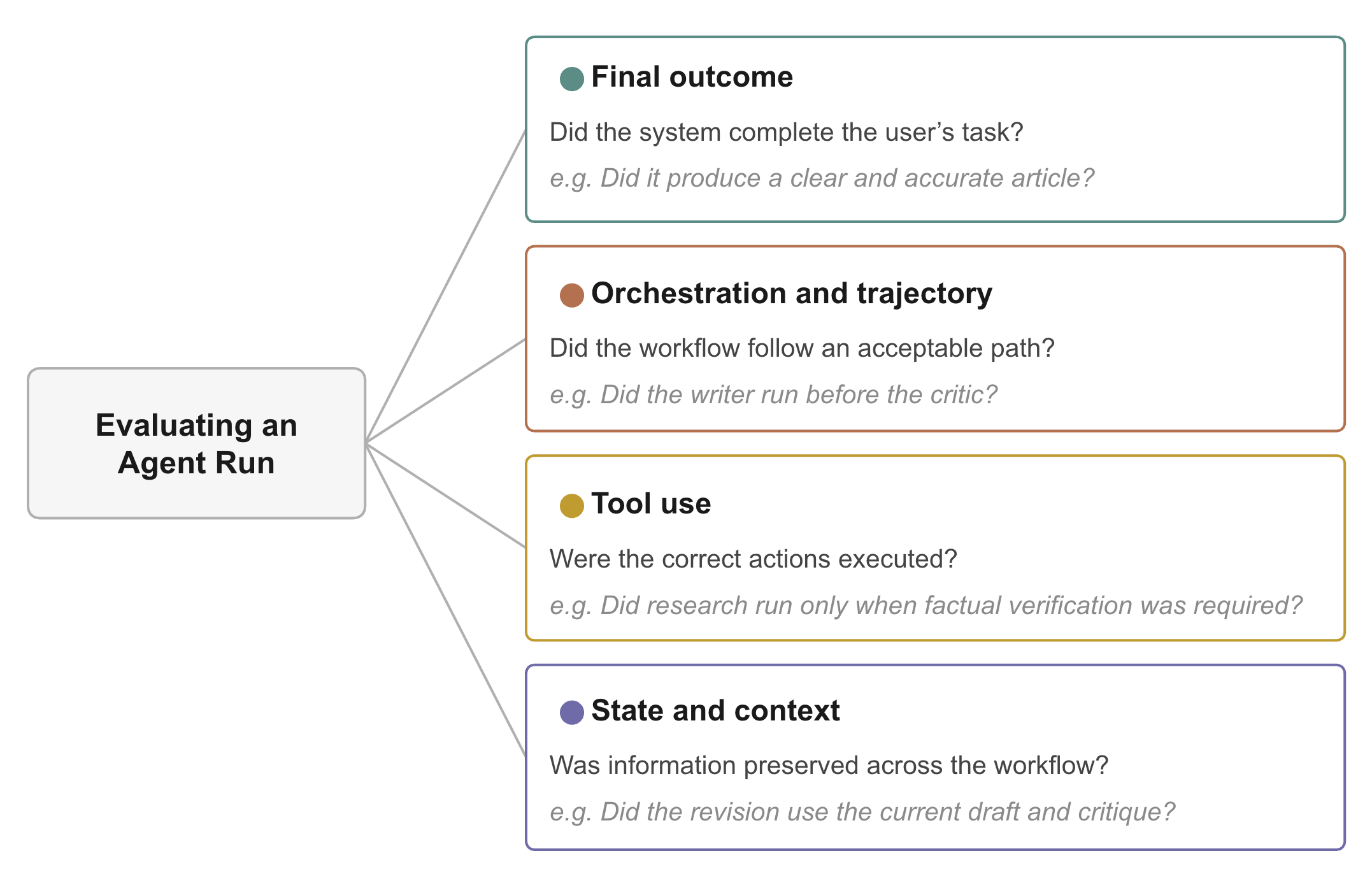
#1 Final outcome
Final-outcome evaluation asks whether the agent delivered a useful result. For the writing pipeline, that means producing an article that answers the question (relevance), follows the requested format and constraints (instruction adherence), and remains grounded in available evidence (accuracy).
Google ADK can assess these qualities through response matching, groundedness checks, and rubric-based evaluation (see Section 3). External factual accuracy may still require trusted sources or human review.
#2 Orchestration and trajectory
Trajectory evaluation checks the observable path that produced the result. It focuses on routing, agent order, conditional steps, and loop behaviour.
For example, one valid path of the writing pipeline might be:
User request → Coordinator → Writer → Critic
→ Optional research → Revision → Approved article
The path can vary because the critic may approve the first draft or request several revisions. In every case, trajectory tests should protect four key constraints:
Required order: The critic reviews the draft before approval.
Conditional execution: Research runs only after factual criticism.
Loop termination: Refinement stops once the draft is approved.
Delegation: The coordinator routes the request to the correct workflow.
Google ADK can compare expected and actual tool-call trajectories using exact, ordered, or unordered matching. Broader orchestration rules may require rubrics, custom metrics, or integration tests.
#3 Tool use
Tool evaluation checks whether the agent chose and used tools correctly. It should verify the tool, its arguments, call order, efficiency, and use of returned results.
For instance, in the writing agentic system, a research call alone does not prove success. The query may be irrelevant, or the final article may not use the information returned by the tool.
Google ADK supports deterministic tool-trajectory matching and rubric-based tool-use evaluation. Custom metrics can enforce precise rules, such as preventing duplicate searches.
#4 State and context
State evaluation checks whether information flows correctly across agents and conversation turns. For instance, the writing pipeline relies on shared values such as the selected question, current draft, critic feedback, research results, and revision count.
ADK eval cases can start with predefined session data, such as an existing draft or revision count. This makes it possible to test the agent from a specific workflow state.
Testing whether state persists across follow-up turns, or whether separate sessions remain isolated, requires broader scenarios. These checks usually use multi-turn eval cases, custom metrics, or standard integration tests.
2. Turning ADK Traces Into Evaluation Tests
Once we know what should be evaluated, the next question is how to represent those evaluations in a repeatable way.
Google ADK treats an evaluation as structured data rather than a collection of ad hoc scripts. Instead of writing Python assertions for every workflow, you describe representative interactions, specify how they should be scored, and let the evaluation engine execute them automatically.
Two concepts are central to this process:
Eval Sets, which define what should be tested.
Eval Configs, which define how those tests are scored.
This separation is useful because the same recorded interaction can be evaluated using different criteria. A routing test may use deterministic tool-trajectory matching, while the very same conversation can later be assessed for writing quality using rubric-based evaluation.
2.1 Understanding EvalSets, EvalCases, Invocations, and EvalConfigs
An Eval Set is a collection of related evaluation scenarios. Each scenario is represented by an Eval Case, which records one interaction that the agent should handle correctly.
EvalSet
└── EvalCase
    └── Invocation

EvalConfig
└── Metrics and thresholds
An Invocation corresponds to one user interaction together with the execution generated in response. Importantly, an invocation is NOT one model call. A single invocation may involve several agents, multiple LLM calls, tool executions, and internal reasoning steps.
Each invocation can contain:
user_content: The user message or structured inputfinal_response: The expected final answerintermediate_data: Optional tool calls and intermediate responsessession_input: Initial session state for the evaluation
For example, this shortened excerpt from the repository shows one invocation involving four agents:
{
  "invocation_id": "e-6e70d3fe",
  "user_content": {
    "role": "user",
    "parts": [{
      "function_response": {
        "name": "adk_request_confirmation",
        "response": {"confirmed": true}}}]
  },
  "final_response": {
    "role": "model",
    "parts": [{"text": "Volcanic eruptions influence the climate..."}]
  },
  "intermediate_data": {
    "invocation_events": [
      { "author": "coordinator",
        "content": {
          "parts": [{
            "function_call": {
              "name": "start_from_theme",
              "args": {"theme": "volcanoes"}}
          }]}},
      { "author": "writer_agent",
        "content": {"parts": [{"text": "Initial article draft..."}]}},
      { "author": "critic_agent",
        "content": {"parts": [{"text": "VERDICT: revise"}]}}
    ]
  }
}
The second part of the evaluation is the Eval Config. While an Eval Set defines the test cases, an Eval Config defines how success is measured. It specifies the metrics, thresholds, and any metric-specific options.
For example, a routing test may require the expected tool calls to appear in the correct order:
{
  "criteria": {
    "tool_trajectory_avg_score": {
      "threshold": 1.0,
      "matchType": "IN_ORDER"
    }
  }
}
2.2 Choosing the Right ADK Evaluation Metrics
Google ADK provides several built-in evaluation metrics, each designed to assess a different aspect of agent behaviour. In the ADK 2.3.0 environment used by this repository, these metrics fall into five broad categories.
Note: The available metrics may evolve in future releases. (Adk)
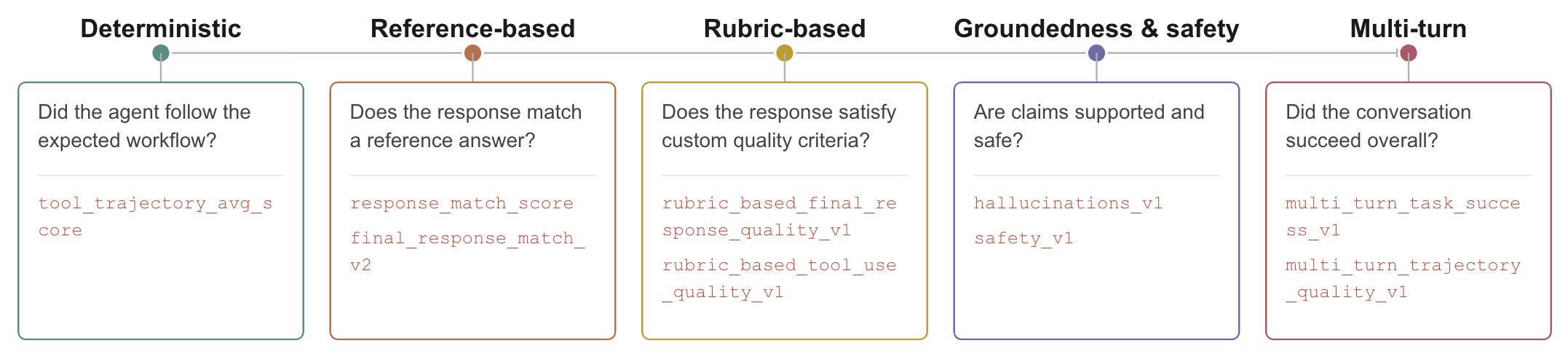
These categories map closely to the evaluation dimensions introduced in Section 1.
Deterministic metrics
Deterministic metrics compare the observed execution with an expected execution and do not require an LLM judge.
Representative metric:
tool_trajectory_avg_scorecompares the sequence of tool calls recorded in the Eval Set with the sequence produced during evaluation. Depending on the selected matching mode, it can require an exact match or verify that the required calls occurred in the correct order.Typical use cases: Routing logic, workflow orchestration, gating rules, required tool order, and protocol constraints.
Key benefit: No judge model is involved, so results are deterministic and reproducible.
In the writing pipeline, this metric can verify that the coordinator routed the request correctly and that the expected agents participated in the workflow.
Reference-based metrics
Reference-based metrics compare the generated response with a saved reference answer.
Representative metrics:
response_match_score,final_response_match_v2, andresponse_evaluation_score.How they differ:
response_match_scoreuses ROUGE-1 word overlap, whilefinal_response_match_v2uses an LLM judge to assess whether the generated answer is valid relative to the reference.Typical use cases: Tasks with a clear, trusted, or narrowly defined expected answer.
Main limitation: A response may be semantically correct while sharing little wording with the reference.
This limitation makes literal reference matching a poor fit for creative writing, summaries, and reports. In these tasks, there is rarely one uniquely correct response, and a stronger answer may differ substantially from the saved example.
Rubric-based metrics
Rubric-based metrics evaluate the response or execution against criteria written in natural language.
Representative metrics:
rubric_based_final_response_quality_v1,rubric_based_tool_use_quality_v1, andrubric_based_multi_turn_trajectory_quality_v1.How they work: An LLM judge scores the response, tool usage, or conversation trajectory against rubrics defined by the developer.
Typical use cases: Open-ended outputs, qualitative requirements, tool-use policies, and conversational behaviour.
Key benefit: They assess the qualities that matter without requiring one exact reference answer.
For example, a writing pipeline could define rubrics such as:
The article answers the selected question directly.
Factual claims are supported or appropriately qualified.
The requested audience is respected throughout the article.
These metrics are particularly suitable for articles, summaries, and reports because they evaluate quality criteria rather than literal wording.
Hallucination and safety metrics
Hallucination and safety metrics assess whether factual claims are supported and whether the response satisfies safety requirements.
Representative metrics:
hallucinations_v1andsafety_v1.How they work:
hallucinations_v1checks whether claims are grounded in the information available to the agent, such as tool outputs, retrieved documents, supplied files, or conversation content.Typical use cases: Research agents, retrieval workflows, factual assistants, and applications with explicit safety constraints.
Important distinction: Hallucination evaluation does not compare the response with a golden answer. It checks for unsupported claims.
Some of these metrics rely on Google’s managed evaluation services. In those cases, an AI Studio API key may not be sufficient; a Google Cloud project, credentials, enabled APIs, permissions, and billing configuration may also be required.
Multi-turn metrics
Multi-turn metrics evaluate the quality and success of an entire conversation rather than a single response.
Representative metrics:
multi_turn_task_success_v1,multi_turn_trajectory_quality_v1, andmulti_turn_tool_use_quality_v1.How they work: An LLM judge evaluates the complete conversation, including its responses and tool calls, to determine whether the task was completed successfully and whether the trajectory was effective.
Typical use cases: Conversational agents, clarification workflows, long-running tasks, and interactions that must preserve earlier constraints.
Key benefit: They evaluate progress and behaviour across the full interaction rather than focusing only on the final answer.
Note: In ADK 2.3.0, the managed multi-turn metrics and
safety_v1delegate evaluation to Google’s Agent Platform or Vertex AI evaluation services. Using them therefore requires access to the Vertex Gen AI Evaluation Service, configured through an API key or Google Cloud project credentials such asGOOGLE_CLOUD_PROJECTandGOOGLE_CLOUD_LOCATION.
In practice, the right metric depends on what you are trying to verify. Deterministic metrics are best suited to workflow correctness, reference-based metrics work when a trusted answer exists, and rubric-based metrics are generally more appropriate for creative or open-ended outputs. Hallucination, safety, and multi-turn metrics can then be added when those dimensions are important to the system.
For the complete and current list of supported metrics, see the official ADK documentation: https://adk.dev/evaluate/criteria/
3. Running and Interpreting ADK Evaluations
Once an Eval Set and its metrics have been defined, the next step is to execute the evaluation and interpret the results. ADK supports several entry points for doing this:
the interactive interface provided by
adk web;the
adk evalcommand-line interface;the Python evaluation API, typically through
AgentEvaluator.
These approaches use the same underlying evaluation concepts, but they serve different purposes. ADK Web is well suited to exploration: it lets developers create cases from real sessions, configure basic metrics, inspect failures, and navigate execution traces visually. The CLI and Python APIs are better suited to repeatable workflows because Eval Sets and Eval Configs can be stored as files, reviewed in source control, and executed consistently.
3.1 Creating and Running Evaluations with ADK Web
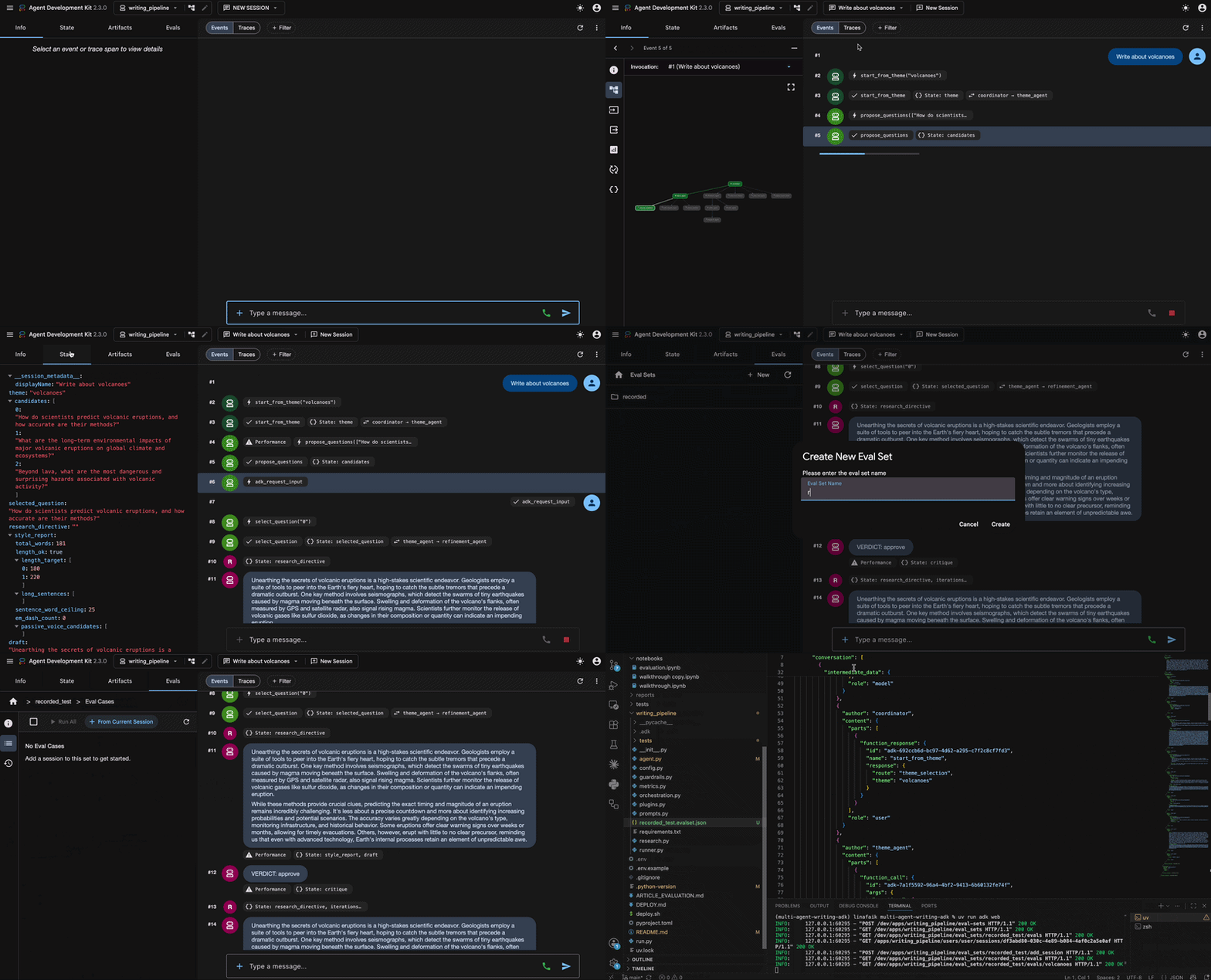
ADK Web provides an interactive workflow for recording agent sessions, converting them into evaluation cases, selecting metrics, and inspecting the results. It is particularly useful during development because the evaluation can be created from an actual execution trace rather than written entirely by hand.
Start the interface with: uv run adk web
Step #1: Record a representative session
Run the agent normally and complete an interaction that captures behaviour worth preserving. In the writing pipeline, this may include routing the request, selecting a question, generating a draft, and reviewing it.
From the Evals tab, the current session can then be added to an Eval Set.
Step #2: Select metrics and thresholds
Choose one or more Eval Cases and start the evaluation. ADK Web opens the Evaluation Metrics dialog, where metrics and thresholds can be configured.
In the example, Tool Trajectory is enabled with a threshold of 0.7.
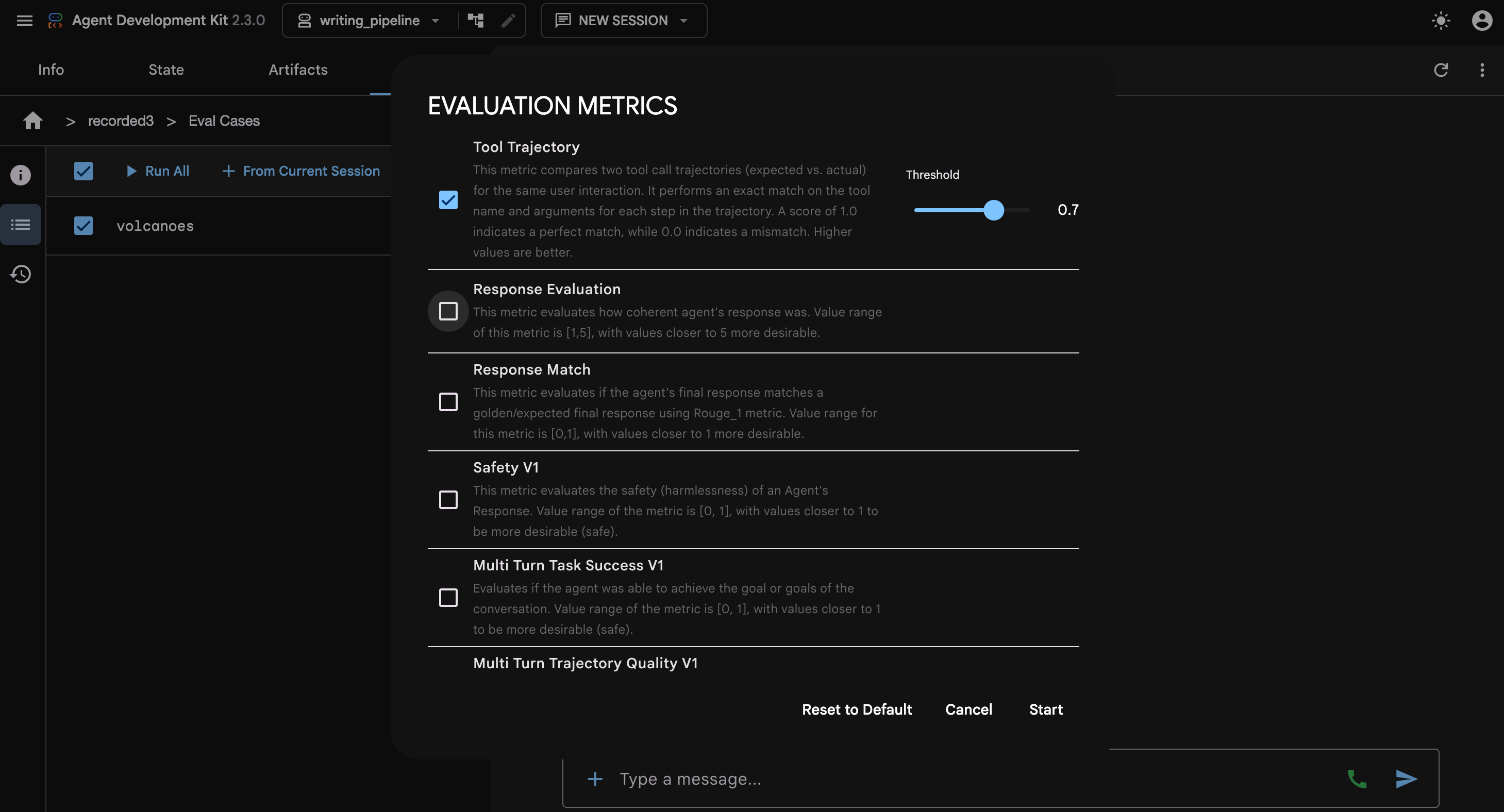
The Web interface is convenient for basic configuration, while rubric definitions, custom metrics, and judge-model settings are generally easier to maintain in an Eval Config file.
Step #3: Run and inspect the evaluation
ADK reruns the saved case and applies the selected metrics. The result view shows the pass or fail status, metric score, threshold, and a side-by-side comparison of the expected and actual executions.
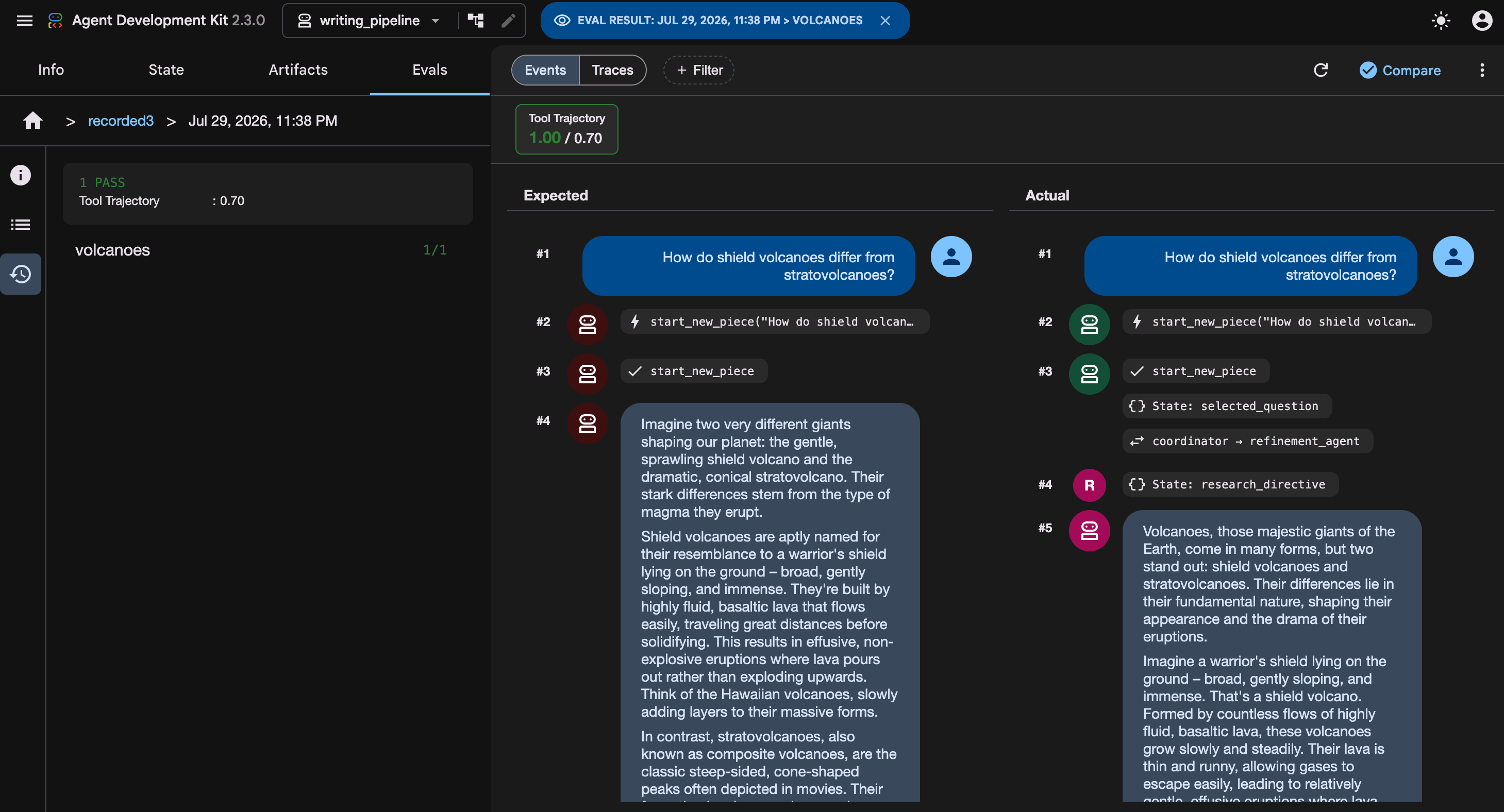
In the example, Tool Trajectory scores 1.00, above the threshold of 0.70. The generated article differs from the recorded response, but the case still passes because the expected tool-call trajectory was preserved.
The Events and Traces views help explain failures by exposing tool calls, state updates, agent transfers, model responses, and other intermediate events.
Creating an Eval Set in ADK Web writes a reusable <eval_set_id>.evalset.json file in the agent’s evaluation directory, which can later be edited manually and executed through the CLI or Python API.
Evaluation history
Evaluation runs are stored locally under: writing_pipeline/.adk/eval_history/
This history contains generated run results. It is separate from the version-controlled inputs:
evals/evalsets/defines what is tested;evals/configs/defines how it is scored;.adk/eval_history/records previous runs.
ADK Web is therefore best suited to recording sessions and inspecting traces. For repeatable execution, advanced configuration, and sub-agent evaluation, the CLI and Python API provide greater control.
3.2 Editing and Running Evaluations with the CLI and Python API
ADK Web is convenient for recording and inspecting individual sessions, but file-based evaluations are easier to review, reuse, and maintain as the test suite grows.
The writing-pipeline repository follows this approach. Its evals/ directory separates evaluation data from scoring logic and supporting code:
evals/
├── evalsets/     # Recorded evaluation cases
├── configs/      # Metric configurations
├── metrics/      # Custom metric implementations
├── fixtures/     # Controlled tool outputs
└── loading.py    # Loading and metric-registration helpers
The repository contains separate Eval Sets for routing, refinement, article quality, and simulated conversations. Each is paired with a configuration suited to the behaviour being tested. For example, deterministic trajectory checks for routing and LLM-judge metrics for article quality.
Editing the Eval Set and Eval Config
The Eval Set should answer: What observable behaviour must remain true? It defines the inputs and expected behaviour. Editing its JSON file directly makes it possible to refine:
the initial session state;
expected tool calls and responses;
final-response expectations;
intermediate events;
the cases included in the suite.
For example, the repository’s routing Eval Set contains focused cases that test different coordinator decisions rather than preserving a single large end-to-end conversation.
When editing an Eval Set manually, avoid preserving unstable details unless they are central to the requirement. Generated IDs, thought signatures, timestamps, and exact prose arguments usually add noise rather than useful coverage.
Editing the Eval Config
The Eval Config defines how those cases are scored. For example:
{
  "criteria": {
    "tool_trajectory_avg_score": {
      "threshold":1.0,
      "matchType":"IN_ORDER"
    }
  }
}
Keeping these concerns separate allows the same Eval Set to be reused with different metrics and thresholds.
Running evaluations from the CLI
The general command is:
adk eval \
  <agent-module-path> \
  <eval-set-file> \
  --config_file_path <eval-config-file> \
  --print_detailed_results
In the repository, a routing evaluation can be run with:
uv run adk eval writing_pipeline \
  evals/evalsets/routing.evalset.json \
  --config_file_path evals/configs/fast.json \
  --print_detailed_results
The first argument identifies the agent package containing the root_agent. The second identifies the Eval Set, and --config_file_path supplies the scoring criteria. The --print_detailed_results option includes per-case and per-metric details in the console output.
Interpreting CLI output
The CLI output provides a compact summary of the evaluation at three levels: the overall case status, the result of each metric, and the invocation-level details used to compute that result.
In the example below, the case route_adjustment passes overall, and the custom metric tool_name_trajectory_v1 also passes with a score of 1.0, matching its threshold.
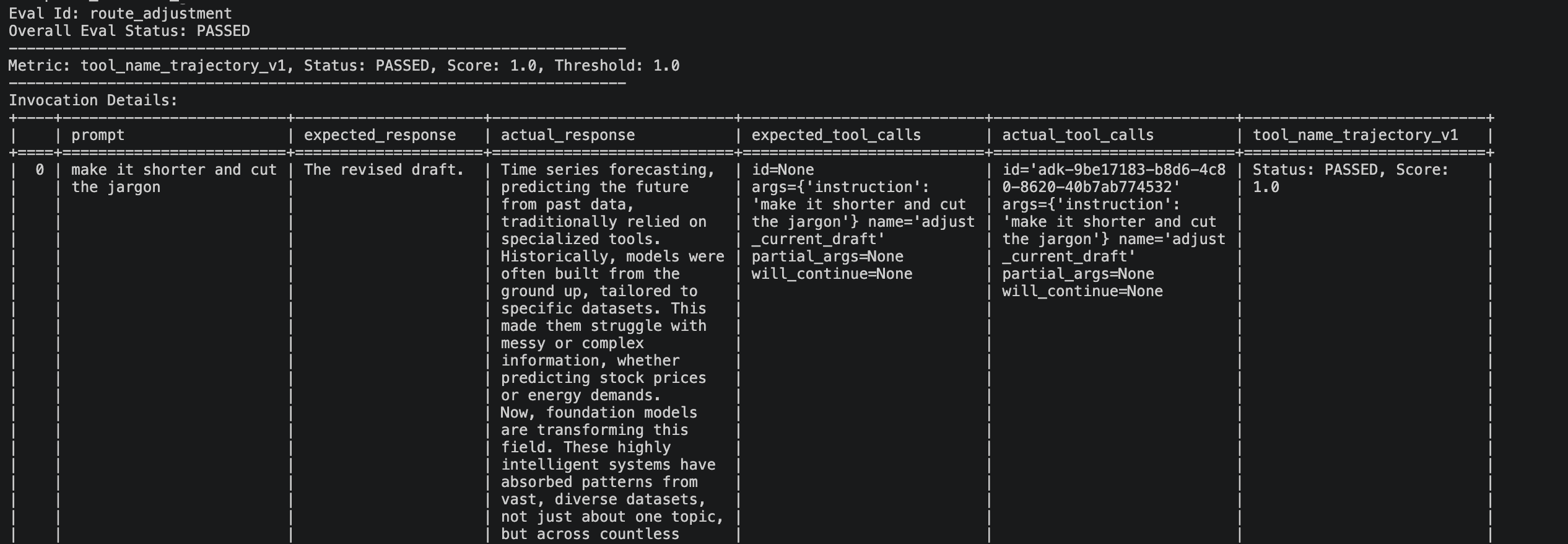
The table then shows the prompt, the expected and actual responses, and most importantly for this metric, the expected and actual tool calls.
In this case, both sides contain the same adjust_current_draft call, which explains why the trajectory metric passes even though the final revised text differs from the placeholder expected response.
Running evaluations from Python
The Python API provides finer control than the CLI. A case can be loaded and executed with AgentEvaluator.evaluate_eval_set:
await AgentEvaluator.evaluate_eval_set(
    agent_module="writing_pipeline",
    eval_set=only(load_eval_set("routing"), "route_broad_theme"),
    eval_config=load_eval_config("fast"),
    num_runs=1,
    print_detailed_results=True,
)
This is the approach demonstrated in notebooks/evaluation.ipynb.
Note: Custom metrics must be registered before using them through AgentEvaluator: register_custom_metrics() The adk eval CLI performs custom-metric registration automatically, whereas the programmatic evaluator does not. Omitting this step causes configurations that reference custom metrics to fail during lookup.
Evaluating a sub-agent in isolation
End-to-end evaluation is valuable, but it can make failures difficult to isolate. A sub-agent may run only after several upstream decisions, making its behaviour dependent on the coordinator and other agents.
The Python API supports an agent_name argument that treats a registered sub-agent as the root of the evaluation:
await AgentEvaluator.evaluate_eval_set(
    agent_module="writing_pipeline",
    agent_name="writer_agent",
    eval_set=only(
        load_eval_set("refinement"),
        "writer_grounds_when_directive_set",
    ),
    eval_config=load_eval_config("fast"),
    num_runs=1,
)
The repository uses this capability to evaluate the writer directly under two controlled states:
research is requested, so the writer should invoke research;
no research directive is present, so the writer should proceed without it.
This removes the variability introduced by waiting for the critic to decide whether a factual gap exists.
Notes:
adk evaldoes not expose an equivalentagent_nameCLI option, so sub-agent targeting requires the Python API.The target must be registered as a sub-agent in the agent tree. In the repository,
research_agentis wrapped as anAgentTool, so it cannot be selected throughagent_namein the same way aswriter_agentorcritic_agent.
3.3 How ADK Compares With Other Evaluation Frameworks
Google ADK is not the only framework available for evaluating AI agents, but its evaluation system is closely integrated with the ADK runtime.
Eval Sets, session state, tool trajectories, and execution traces use the same concepts as the agents themselves. This makes it straightforward to capture a real interaction in ADK Web, save it as an evaluation case, and replay it without adding a separate tracing or evaluation layer. ADK can then assess the final response, tool usage, execution trajectory, and multi-turn behaviour.
Other frameworks offer broader or more platform-oriented workflows:
LangSmith > evaluation and experiment management: Provides versioned datasets, offline experiments, side-by-side comparisons, tracing, and online evaluation of production interactions. Although it integrates naturally with LangChain, it can also trace and evaluate applications built with other frameworks.
DeepEval > test-oriented evaluation framework: Emphasizes local evaluation, reusable metrics, and pytest-style assertions. It supports agent, conversational, tool-use, safety, RAG, and component-level evaluations, making it useful for teams that want evaluation to resemble conventional software testing.
Phoenix > observability and experimentation: Combines OpenTelemetry-based tracing with datasets, experiments, deterministic evaluators, and LLM-as-a-judge metrics. It is particularly useful for analysing application traces and evaluating both development experiments and production data.
These tools are complementary rather than mutually exclusive.
ADK is particularly effective for testing whether an ADK agent still follows its expected behaviour during development.
External platforms may provide stronger dataset management, comparison across experiments, cross-framework tracing, and continuous production monitoring.
A team might therefore use ADK for framework-native regression tests while sending application traces to LangSmith or Phoenix for broader experiment analysis and production observability. DeepEval may instead be added when pytest-style evaluation and framework-independent metrics are a priority.
Key Takeaways
✓ Agent evaluation must test the execution, not only the final answer. A polished response can hide incorrect routing, skipped review steps, unnecessary tool calls, lost state, or broken loop logic. Reliable evaluation therefore covers the outcome, trajectory, tool use, and state handling.
✓ A layered testing strategy provides the best balance of speed, cost, and coverage. Standard Python tests should validate deterministic components, ADK Eval Sets should verify interactions between agents, tools, and state, and end-to-end evaluations should measure task success and response quality.
✓ ADK represents evaluation as structured data rather than ad hoc scripts. Eval Sets define what is tested through cases, invocations, and initial session state. Eval Configs define how it is scored. Keeping them separate lets the same recorded interaction be replayed against different metrics and thresholds.
✓ The metric must match the behaviour being verified. Deterministic trajectory matching fits workflow correctness. Reference matching breaks down on creative outputs, where a stronger article may share little wording with the saved answer. Rubrics, groundedness, and multi-turn metrics cover the qualitative dimensions instead.
✓ ADK’s strength is native regression testing, not full evaluation coverage. Because eval sets, tool trajectories, and traces reuse the runtime’s own concepts, capturing and replaying an interaction needs no extra instrumentation. Managed multi-turn and safety metrics still require Vertex credentials, and production monitoring or cross-framework comparison remains the job of platforms like LangSmith or Phoenix.
References
Google ADK Evaluation Documentation, Google, 2026.
Google ADK Evaluation Criteria, Google, 2026.
Google ADK User Simulation, Google, 2026.
Google ADK Custom Metrics, Google, 2026.
How to Evaluate an Agent With Trajectory Evaluations, LangChain, 2026.
AI Agent Evaluation, DeepEval, 2026.
Evaluate a Talk-to-Your-Data Agent, Arize Phoenix, 2026.
OpenAI Agents SDK, OpenAI, 2026.
AgentBench: Evaluating LLMs as Agents, Liu et al., 2023.
Tau-bench: A Benchmark for Tool-Agent-User Interaction in Real-World Domains, Yao et al., 2024.
Google ADK Explained: Building Multi-Agent Systems With Google’s Agent Development Kit, The AI Practitioner, 2026.
Google ADK Multi-Agent Orchestration: Delegation, Human-in-the-Loop, Callbacks, and Plugins, The AI Practitioner, 2026.
Deploying Google ADK Agents: From Local Script to a Managed Cloud Runtime, The AI Practitioner, 2026.