


This article is also available as a podcast! If you’re on the go or just want to absorb the content in audio format, you can listen to the full episode below 👇 The podcast is also available on Spotify and Apple Podcasts.

Agent frameworks are no longer judged only by how well they compose agents, tools, memory, and workflows. That is now the baseline. LangGraph, CrewAI, AutoGen, and Google ADK all help structure agentic systems in different ways.
Production introduces a different problem: the agent has to become a service.
A deployed agent needs more than orchestration: it needs a runtime, durable sessions, persistent artifacts, secure credentials, observability, authentication, and a safe way for clients to reach it. That is where ADK’s cloud-native angle matters. Beyond defining agents, ADK connects naturally to Google Cloud deployment paths.
Objective
This article explains how to deploy a Google ADK agent as a cloud service, using the same multi-agent writing pipeline from the previous articles as the running example.
After reading this article, you will understand:
Where should the agent run? How to choose between Agent Engine, Cloud Run, and GKE.
Where should the agent’s state live? How to externalize sessions, artifacts, memory, secrets, and model access.
How should clients reach the agent? How to test the deployed service, stream responses, configure CORS, and connect a frontend.
This article is the third part of the Google ADK series. The first article introduced ADK’s building blocks; the second article added orchestration patterns.
Prerequisites: readers should have read at least the first article in the series or have a basic working knowledge of Google ADK.
Tools & libraries: Google ADK, Cloud Run, Agent Engine / Agent Runtime, GKE, Cloud Build, Artifact Registry, Secret Manager, Cloud Storage, and optionally Cloud SQL or Vertex AI RAG.
You can find the code here on GitHub.
1. From Local Runtime to Cloud Runtime
The first deployment decision is where the agent should run.
The same ADK agent can run on different Google Cloud runtimes, but each option changes the operating model: endpoint, state, credentials, scalability, and infrastructure control.
1.1 Which deployment option fits the agent?
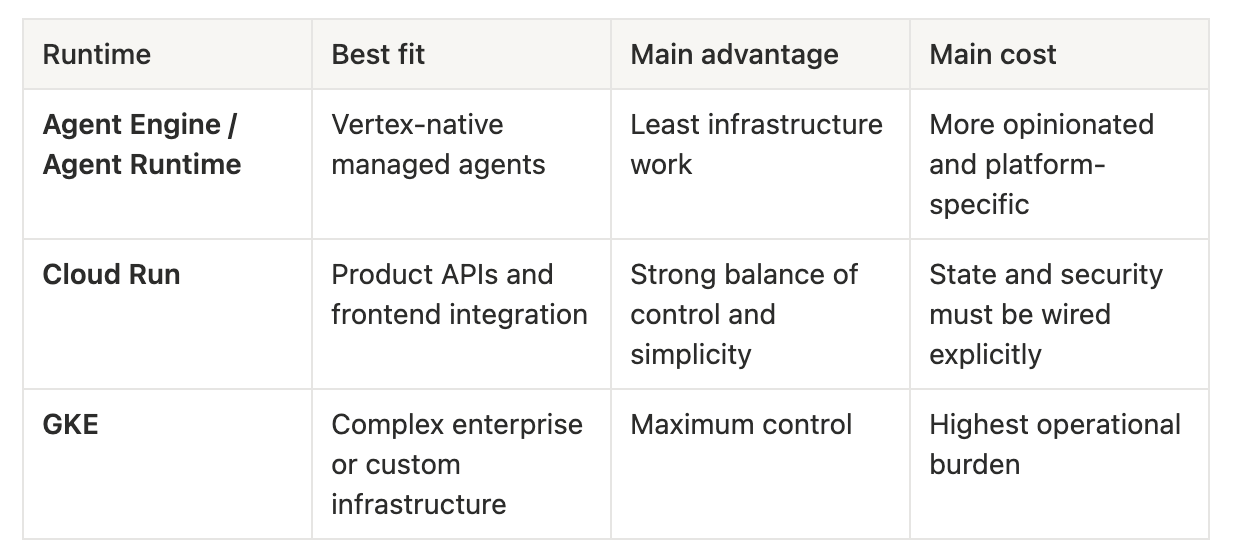
Agent Engine / Agent Runtime
Agent Runtime is the most managed option. It is designed to host agents built with ADK while handing more of the serving layer to Google Cloud.
Best fit: when the priority is managed infrastructure and the application is already close to the Vertex AI / Gemini Enterprise Agent Platform ecosystem.
Strengths
Managed agent runtime: less infrastructure to package, deploy, and operate manually.
Vertex-native integration: strong fit when the agent already depends on Vertex AI services.
Managed platform path: useful when the application fits the Agent Platform abstractions.
Lower operational burden: fewer container and infrastructure concerns.
Trade-offs
More opinionated: less control over the serving shape than a custom container.
Less portable: the deployment is more tied to the Vertex AI / Agent Platform ecosystem.
Frontend access may require an extra layer: browser applications often still need a backend, gateway, or proxy rather than calling the runtime directly.
Model flexibility should be verified: pipelines that rely on LiteLLM or non-Vertex model providers need extra validation before committing to this path.
Cloud Run
Cloud Run runs the agent as a container behind a managed service endpoint. It is the practical middle ground: more control than Agent Runtime, much less operational work than Kubernetes.
Best fit: when the agent needs a real HTTPS endpoint, custom dependencies, and enough control to integrate with a product frontend.
Strengths
Public HTTPS endpoint: easy to test and integrate with a custom frontend.
Container control: dependencies, model clients, LiteLLM integrations, and custom FastAPI behavior remain under the developer’s control.
Autoscaling: the service can scale with traffic and scale down when idle.
Portable workflow: the deployment model is standard container-based serving.
Good first production target: the infrastructure boundary is visible without being overwhelming.
Trade-offs
State must be externalized manually: sessions, artifacts, and memory cannot safely remain in process.
IAM must be configured explicitly: the runtime service account needs access to models, storage, secrets, and databases.
Runtime settings matter: timeout, concurrency, memory, and minimum instances need to be tuned for agent workloads.
Frontend security remains the application’s responsibility: CORS, authentication, and user access must be designed.
Google Kubernetes Engine (GKE)
GKE runs the agent on Kubernetes. It offers the highest degree of control, but also the highest operational burden.
Best fit: when the organization already runs Kubernetes or when the agent has infrastructure requirements that Cloud Run cannot satisfy.
Strengths
Maximum infrastructure control: networking, scaling, sidecars, service mesh, and deployment strategy can be customized.
Good fit for platform teams: useful when Kubernetes is already the organization’s standard runtime.
Specialized workloads: better suited when the agent needs custom hardware, GPUs, private networking, or complex internal service dependencies.
Enterprise operations: supports advanced deployment, policy, and observability patterns.
Trade-offs
Highest complexity: clusters, manifests, scaling policies, and maintenance become part of the project.
Slower path to first deployment: more infrastructure must be configured before the agent is reachable.
More operational responsibility: reliability, cost, security, and upgrades require stronger platform discipline.
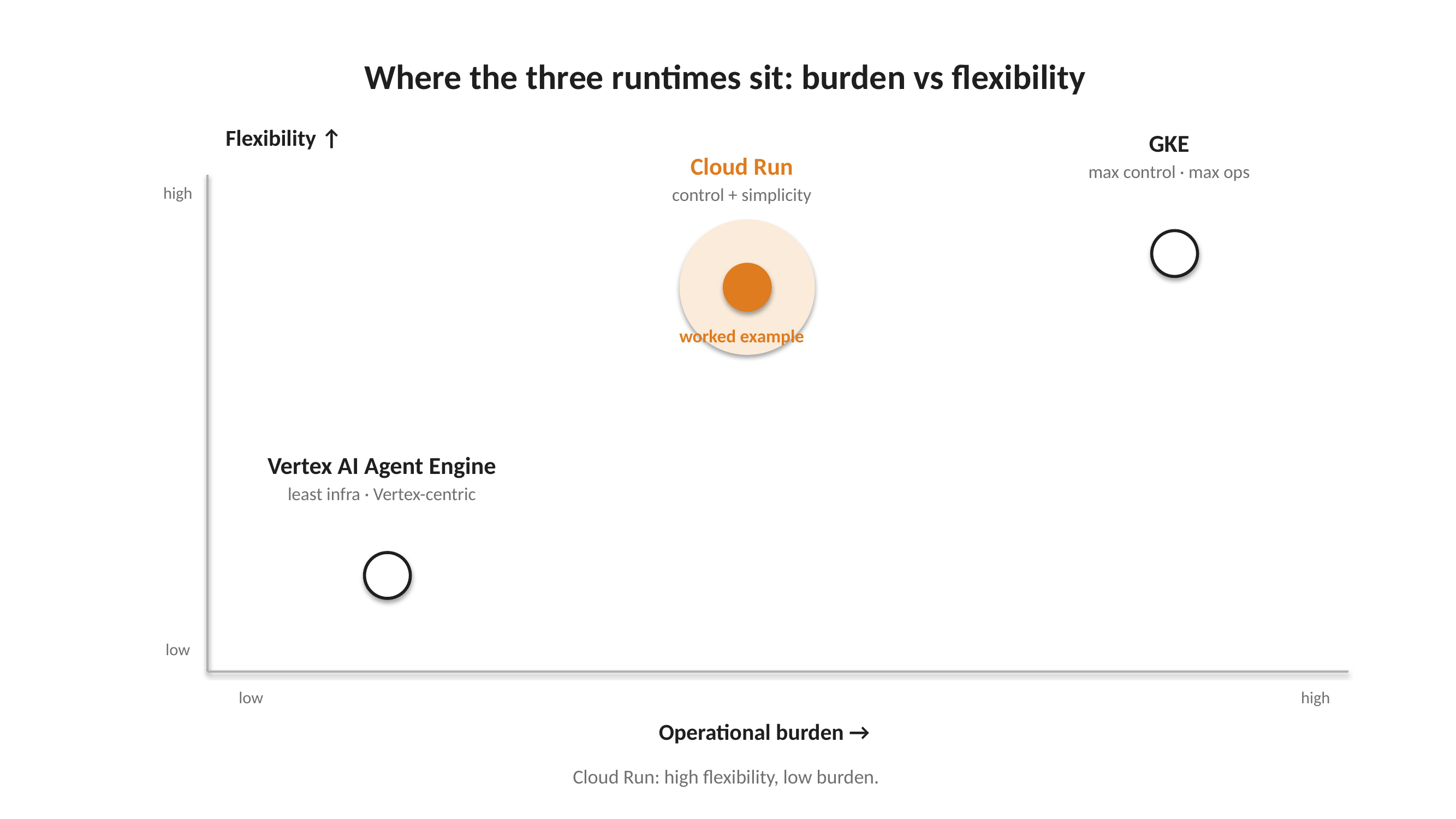
A simple decision table summarizes the choice:
1.2 What changes after deployment?
Local development hides assumptions that deployment makes explicit. The same agent may run, but its environment changes.
Process lifetime: locally, the agent often runs in one long-lived process. In the cloud, an instance can be restarted, replaced, or duplicated. Conversation state cannot rely on process memory.
State location: in-memory services and local storage are convenient during development. In production, sessions, artifacts, and long-term memory need external backends.
Credentials: local model calls may work because the developer is authenticated or because keys are loaded from
.env. In production, the service runs as a runtime identity, with permissions configured through IAM and secrets provided through Secret Manager.Filesystem: local files are easy to write and inspect. A deployed container should not treat its filesystem as durable storage. Generated outputs should be persisted through an artifact backend such as Cloud Storage.
Client access:
adk webis a development surface. A production frontend is a separate client, often on another domain, so CORS, authentication, and browser-safe access patterns become part of deployment.
Deployment is therefore not only a packaging step. It changes where state lives, how credentials are provided, and how clients reach the agent.
1.3 Why Cloud Run is the worked example
Cloud Run is the best runtime for this article because it sits between two extremes.
Agent Engine / Agent Runtime hides more infrastructure. That can be useful, but it also hides some of the boundaries this article needs to explain.
GKE exposes every infrastructure detail. That can be powerful, but it adds Kubernetes concepts that are not necessary for a first production deployment.
Cloud Run provides the useful middle ground.
It keeps the deployment concrete:
The agent is packaged as a container.
The service receives a real HTTPS endpoint.
The runtime identity is explicit.
The state backends must be configured deliberately.
The frontend integration can be tested directly.
It also preserves flexibility. The writing pipeline can use Gemini through Vertex AI, but it can also keep the model-swapping pattern introduced, including external providers through LiteLLM, because the container remains under the developer’s control.
The rest of this article therefore deploys the writing pipeline to Cloud Run.
2. Persisting Sessions, Artifacts, and Memory
Once the runtime is chosen, state becomes the next design question.
Any agentic system must preserve context across turns: the conversation, intermediate decisions, tool outputs, and generated artifacts. In deployment, that state should live outside the serving process.
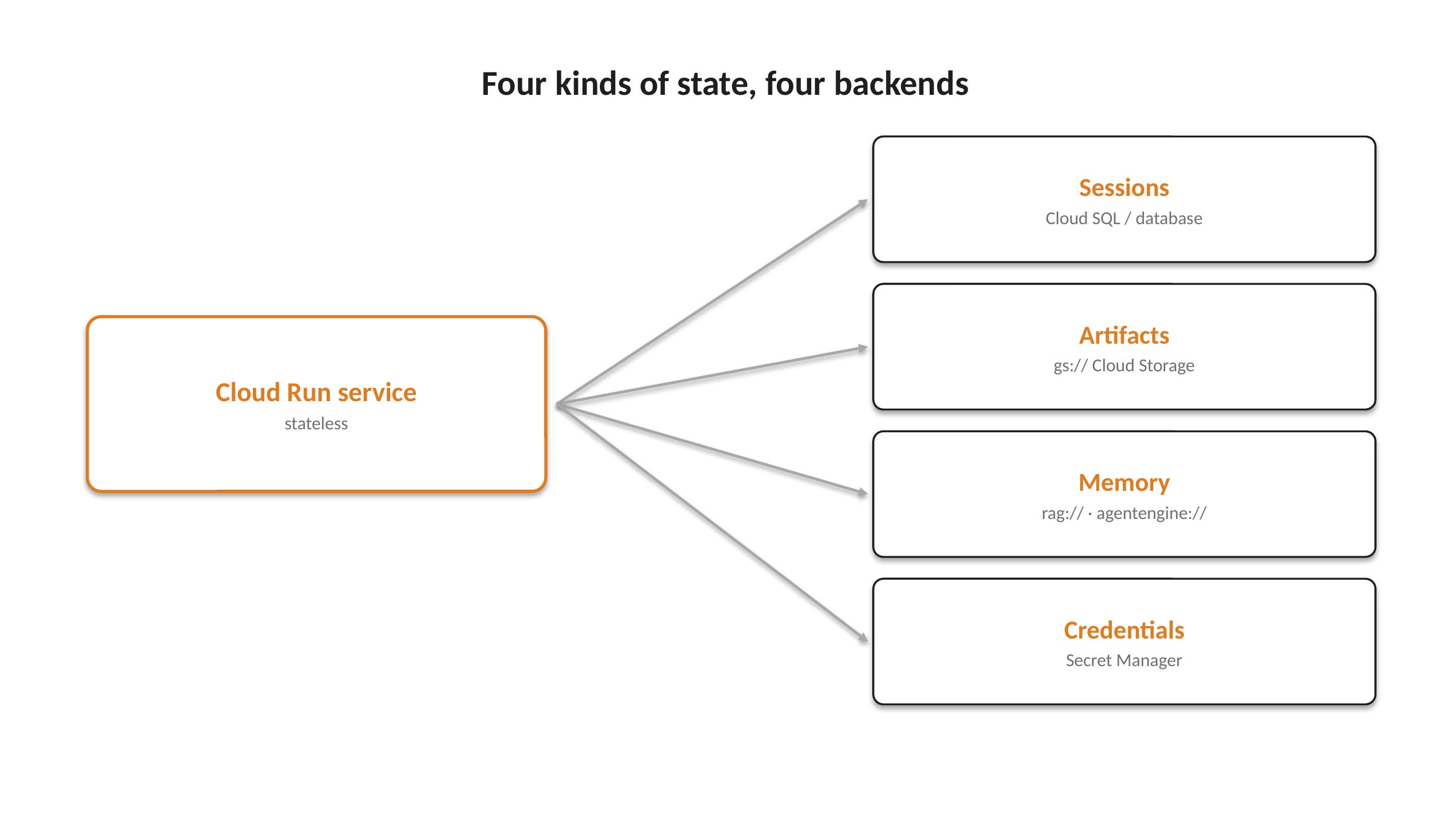
ADK separates this into sessions, artifacts, memory, and credentials.
2.1 Sessions: preserving the conversation
A session is the short-term state of an agent conversation. It stores what the agent needs to continue across turns: previous messages, intermediate decisions, tool results, and any state required by the workflow.
In deployment, there are two main options.
In-memory sessions: the simplest option. They are cheap, fast, and useful for local tests or lightweight demos. The trade-off is durability: sessions disappear when the container restarts, scales, or is replaced.
Persistent sessions: the production-oriented option. Sessions are stored in an external backend, such as a database or managed session service. This allows the serving process to remain stateless while the conversation survives restarts and scaling.
The trade-off is cost and complexity. Persistent sessions require an external service to provision, secure, monitor, and pay for. With Cloud SQL, for example, even a small database instance has a standing cost, unlike a Cloud Run service that can scale to zero.
Option Backend Behavior Best for In-memory sessions Process memory Simple, but reset on restart or scale-out Local tests and lightweight demos Persistent sessions Database or managed session backend Survive restarts and scaling Realistic staging and production
In the demo repository, this choice is controlled by the PERSIST_SESSIONS variable in .env.
When
PERSIST_SESSIONS=false, sessions stay in memory.When
PERSIST_SESSIONS=true, the deployment script provisions a Cloud SQL PostgreSQL instance and stores sessions there.
When persistence is enabled, the demo follows an important credential pattern: the database password is generated once, the session database URL is stored in Secret Manager, and Cloud Run receives it at runtime. The password is not committed to Git and is not baked into the image.
The resulting architecture is simple:
Cloud Run runs the agent.
Cloud SQL stores the conversation.
Secret Manager stores the database connection string.
Runtime configuration is injected into the container.
This keeps the service stateless while allowing the agent to remain conversational.
2.2 Artifacts: preserving generated outputs
While sessions preserve the conversation, artifacts preserve what the agent produces.
Artifacts can include generated files, draft documents, reports, images, exports, or intermediate outputs created by tools. They should be treated differently from conversation state because they often need to be downloaded, reused, inspected, or stored beyond a single session.
In deployment, there are two main options.
Local or in-memory artifacts: simple for development, but not durable. Outputs may disappear when the container restarts or is replaced.
Persistent artifacts: the production-oriented option. Outputs are stored in an external backend, typically Cloud Storage. ADK supports this through
-artifact_service_uri, for example with ags://bucket.
Option Backend Behavior Best for Local or in-memory artifacts Process memory or container filesystem Simple, but not durable Local tests and lightweight demos Persistent artifacts Cloud Storage or another artifact backend Survive restarts and can be reused Production outputs and downloadable files
The demo does not persist artifacts. It focuses on running the agent interactively through the ADK web UI and demonstrating session persistence. If the goal were to keep generated outputs, such as drafts, critiques, markdown exports, or evaluation reports, the deployment would add an artifact backend:
--artifact_service_uri="gs://my-agent-artifacts"2.3 Memory and credentials: preserving context and access
Memory and credentials are separate concerns, but both become explicit at deployment time.
Memory preserves context across sessions. It is different from session state: sessions remember what is happening in the current conversation, while memory stores what should carry across conversations, such as user preferences, tone constraints, recurring instructions, or project context.
ADK exposes memory through the --memory_service_uri flag. The main options are:
In-memory memory service: useful for local development and quick tests. It keeps memory inside the running process, so it is not durable and should not be used as the production memory layer. In ADK, this can be forced with
memory://.Vertex AI RAG memory service: useful when memory should be grounded in a RAG corpus. ADK supports this with
rag://<rag_corpus_id>, which connects the agent to Vertex AI RAG Memory Service.Agent Platform Memory Bank: useful when the agent needs managed long-term memories across sessions. Memory Bank is designed to let agents store and retrieve long-term user memories, and ADK connects to it with
agentengine://<agent_engine_id>.
Option URI Best for In-memory memory memory:// Local development and prototypes Vertex AI RAG memory rag://<rag_corpus_id> Retrieval-backed memory over a corpus Agent Platform Memory Bank agentengine://<agent_engine_id> Managed long-term memories across sessions
Credentials are not optional. Once the agent is deployed, it needs secure access to model providers, databases, and any cloud services it depends on.
In the demo, the model provider is selected with MODEL_PROVIDER in .env. If Gemini is selected, the deployment uses a Google API key. If Claude is selected, it uses an Anthropic API key. The deployment script reads the relevant value from the local .env file and stores it in Secret Manager.
This is the important boundary: the .env file is used to configure deployment, but it is not shipped with the service. The deployed container receives secrets at runtime.
Three rules should guide credential handling:
Keep keys out of Git: provider keys, database URLs, and service credentials should never be committed.
Keep keys out of images: rebuilding, sharing, or scanning the container image should not expose secrets.
Keep keys out of the browser: a frontend should never receive model provider keys, database URLs, or service account credentials.
In the demo, Secret Manager stores:
google-api-keywhen Gemini is selected.anthropic-api-keywhen Claude is selected.session-db-urlwhen Cloud SQL session persistence is enabled.
The deployment flow is:
Local .env
  ↓ read by deploy.sh
Secret Manager
  ↓ injected at runtime
Cloud Run service
  ↓ used by the ADK agent
Model provider / Cloud SQL
Reading secrets from the local .env during deployment, storing them in Secret Manager, and injecting them into Cloud Run at runtime keeps credentials out of the source code and out of the container image.
More broadly, it reinforces the main deployment principle of this section: not all state should be handled the same way.
Sessions preserve the conversation.
Artifacts preserve generated outputs.
Memory preserves longer-term context.
Secret Manager preserves credentials and connection strings.
Each of these has a different lifetime, risk profile, and backend. A deployable agent should make those boundaries explicit instead of treating “state” as a single generic storage problem.
3. Testing, Securing, and Exposing the Agent
Getting the agent to run in the cloud is only the first checkpoint.
The deployment still needs to be verified, secured, and exposed correctly. That includes checking the live service, handling credentials, controlling access, and preparing the path for a frontend.
3.1 Packaging and deploying the ADK app
The deployment script turns the local ADK project into a Cloud Run service. Deployment step-by-step and script are available in Github
It does three main things:
Prepares Google Cloud: it enables the required APIs, including Cloud Run, Cloud Build, Artifact Registry, Secret Manager, and Cloud SQL Admin when session persistence is enabled.
Moves configuration into the cloud: it reads
.env, stores model keys and optional database URLs in Secret Manager, and injects them into Cloud Run at runtime.Deploys the agent: it calls
adk deploy cloud_run, passing ADK configuration first and Cloud Run settings after-.
The central command is:
uv run adk deploy cloud_run \
  --project="$PROJECT_ID" \
  --region="$REGION" \
  --service_name="$SERVICE_NAME" \
  "${ADK_FLAGS[@]}" \
  "$AGENT_PATH" \
  -- "${RUN_FLAGS[@]}"
This command has two layers:
ADK flags configure the agent server, such as the app path, UI, and optional session service URI.
Cloud Run flags configure the deployed service, such as environment variables, secrets, scaling, public access, and optional Cloud SQL attachment.
The script is then run with:
chmod +x deploy.sh
./deploy.sh
Conceptually, the flow is simple:
.env
  ↓
Secret Manager / optional Cloud SQL
  ↓
adk deploy cloud_run
  ↓
Cloud Build + Artifact Registry
  ↓
Cloud Run service
The important point is not the script itself, but the boundary it creates: local configuration becomes runtime configuration, credentials move into Secret Manager, optional session state moves into Cloud SQL, and the ADK app becomes a reachable cloud service.
3.2 Testing the live service
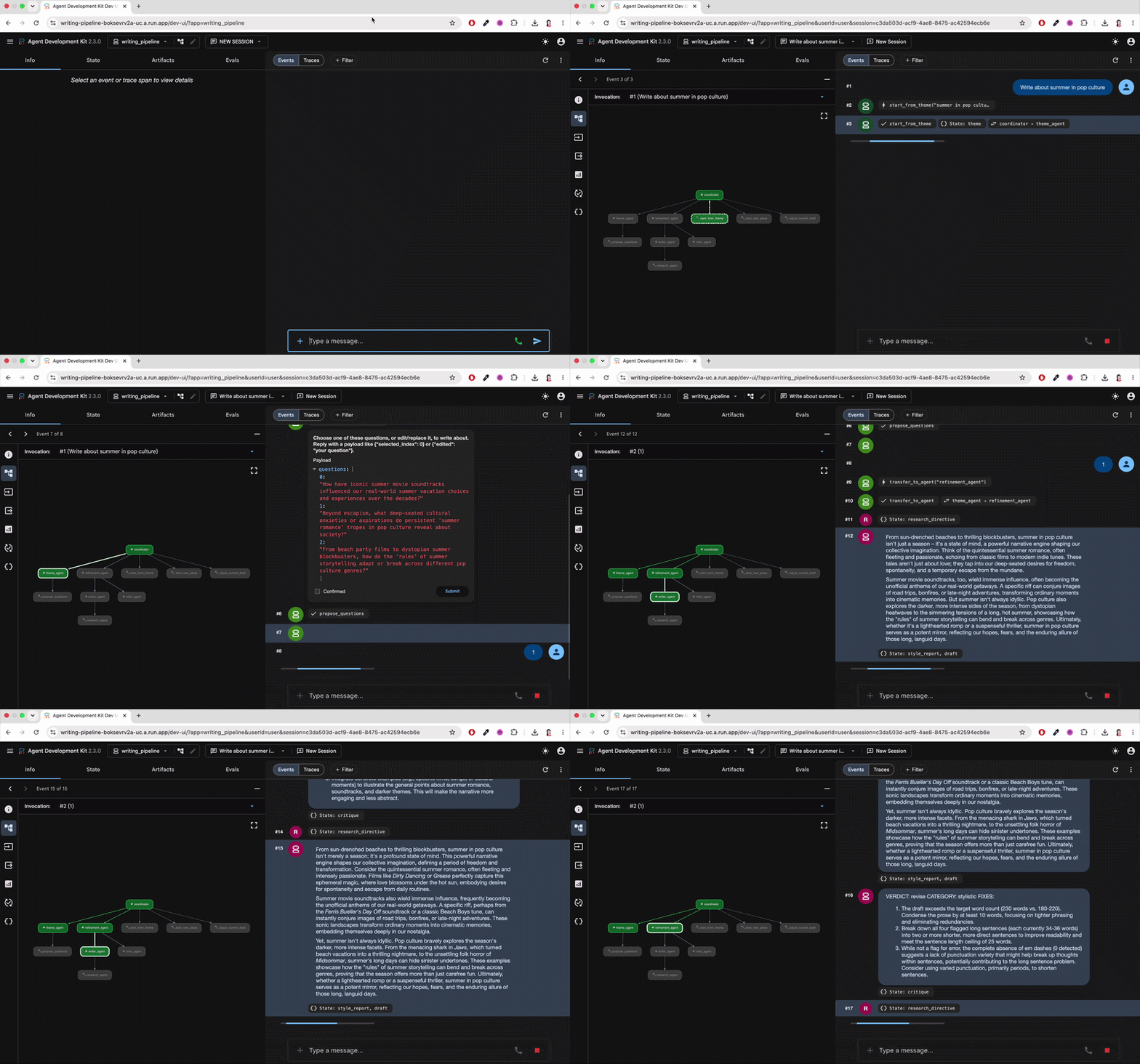
After the deployment script runs, verification starts in two places: the browser endpoint where the agent is served, and the Google Cloud console where the underlying resources can be inspected.
The script prints a Cloud Run URL at the end of the deployment. Opening that URL in the browser loads the ADK web UI, so the deployed agent can be tested directly without running adk web locally.
Cloud Run service
The Cloud Run service page is the main place to monitor the deployed agent.
Variable link: https://console.cloud.google.com/run/detail/$REGION/$SERVICE_NAME/metrics?project=$PROJECT_ID
Demo project example: https://console.cloud.google.com/run/detail/us-central1/writing-pipeline/metrics?project=multi-agent-writing-adk
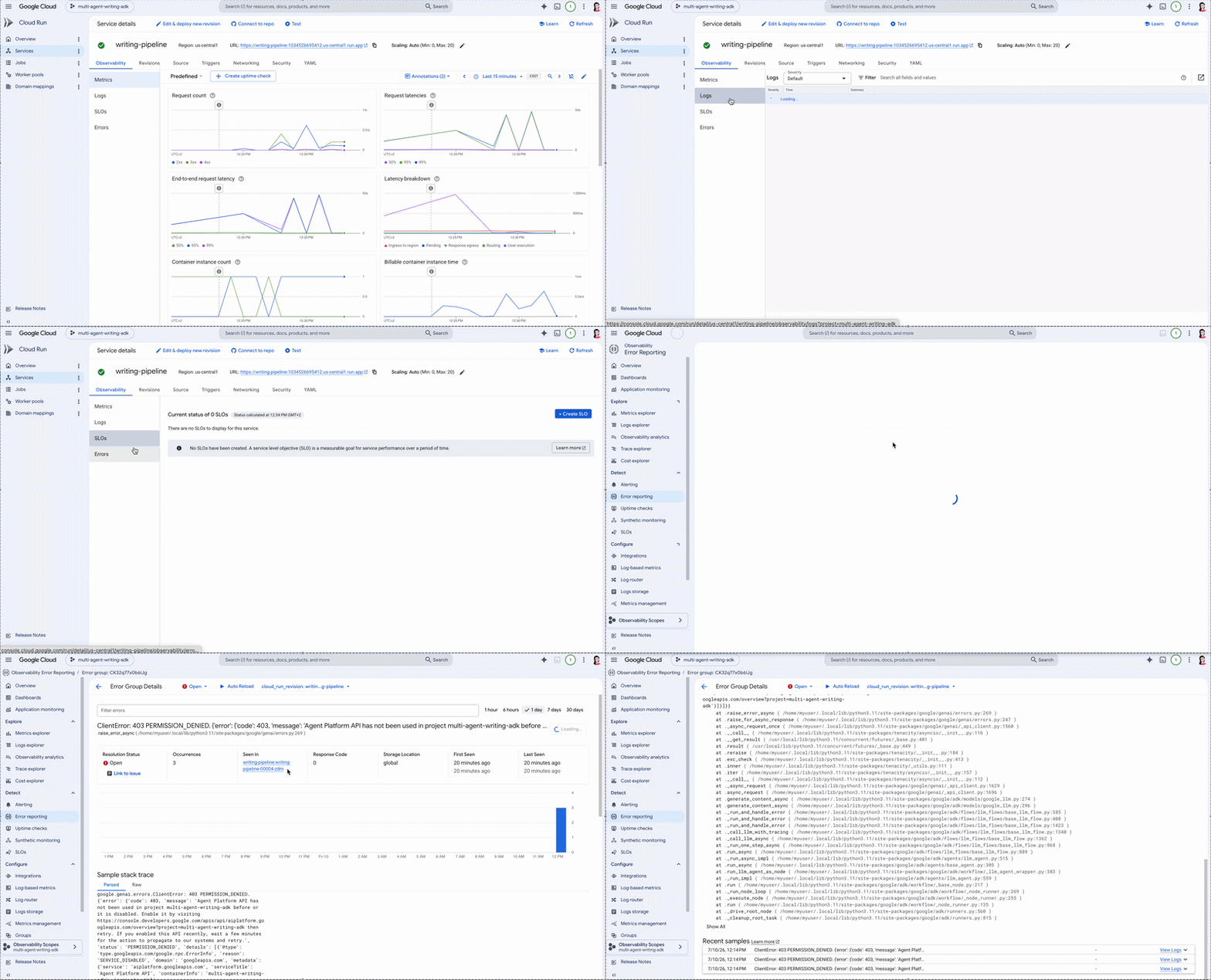
On this page, the most useful signals are:
Request count: confirms that calls are reaching the service.
Request latency: shows how long responses take, including model and tool execution time.
Container instance count: shows whether Cloud Run is scaling the service up or down.
Billable instance time: helps estimate cost, especially when the service receives traffic or minimum instances are configured.
Errors and logs: help identify runtime failures, model-provider errors, missing secrets, or permission issues.
Revisions: show each deployed version of the service and make rollback possible if a new deployment breaks.
For agents, latency and errors are especially important. A slow response may come from the model, a tool call, a cold start, or an overloaded instance. Cloud Run metrics make those symptoms visible from the service level.
Cloud Build
Cloud Build shows how the container image was produced.
Variable link: https://console.cloud.google.com/cloud-build/builds?project=$PROJECT_ID
Demo project example: https://console.cloud.google.com/cloud-build/builds?project=multi-agent-writing-adk
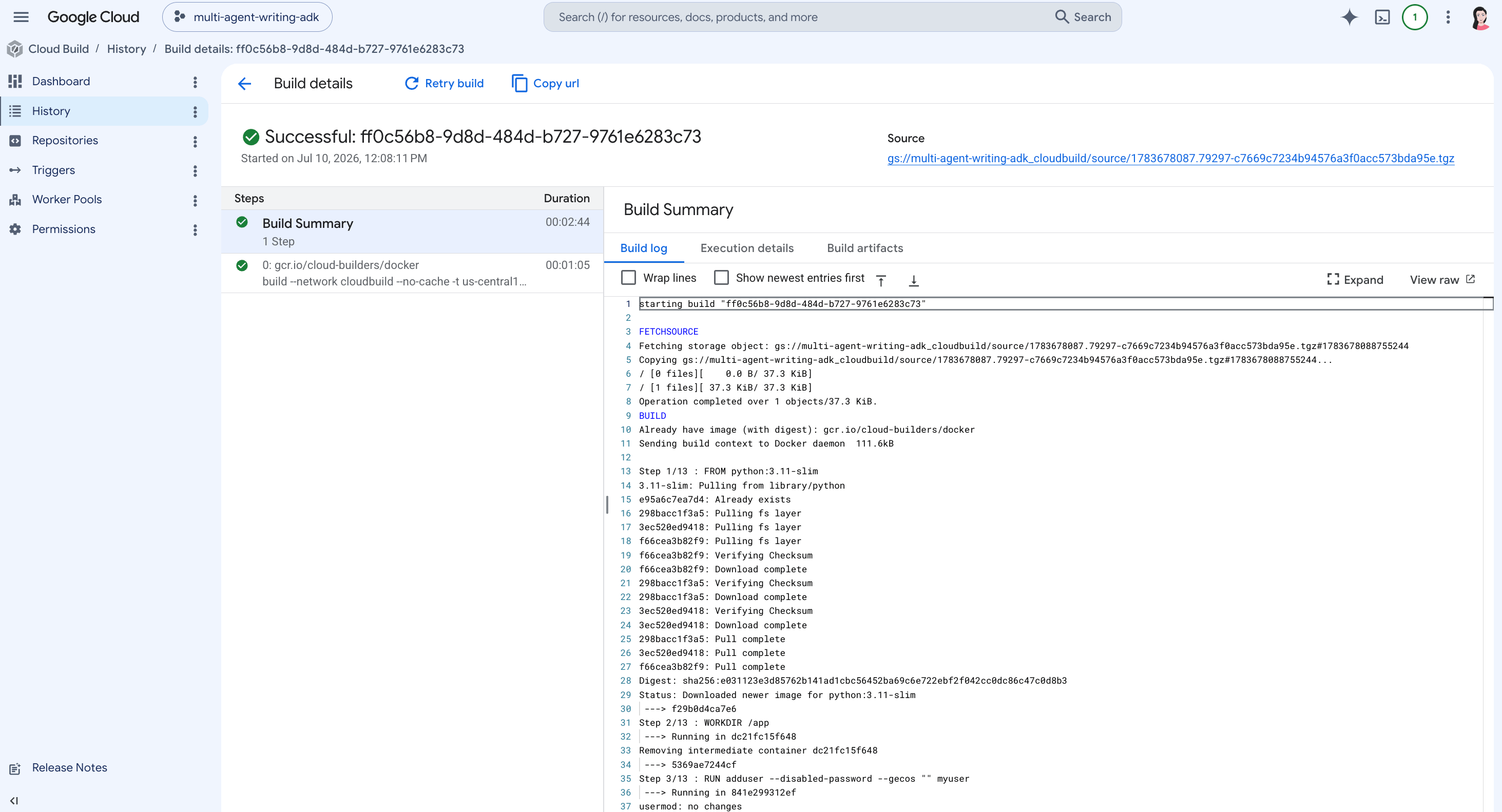
This page is useful when deployment fails before Cloud Run starts. It helps check:
whether the Docker image was built successfully;
which build step failed;
whether dependencies installed correctly;
whether the build context was uploaded;
how long the image build took.
Artifact Registry
Artifact Registry stores the image produced by the build.
Variable link: https://console.cloud.google.com/artifacts?project=$PROJECT_ID
Demo project example: https://console.cloud.google.com/artifacts?project=multi-agent-writing-adk
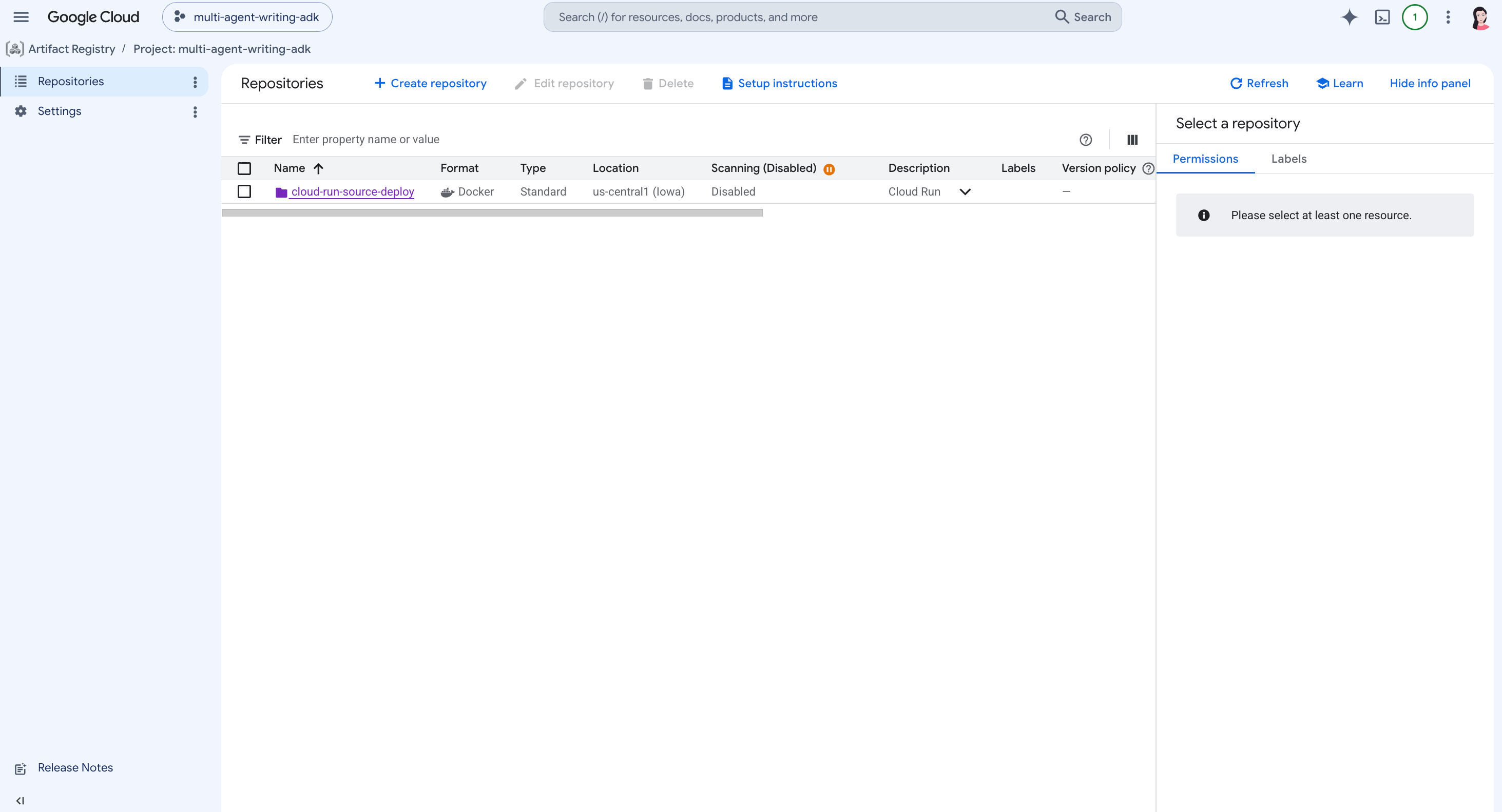
This page verifies that:
the Docker repository exists;
the image was pushed successfully;
the image version can be inspected;
old images can be reviewed or cleaned up if needed.
Artifact Registry is useful for tracing what code version was actually deployed.
Secret Manager
Secret Manager stores runtime credentials.
Variable link: https://console.cloud.google.com/security/secret-manager?project=$PROJECT_ID
Demo project example: https://console.cloud.google.com/security/secret-manager?project=multi-agent-writing-adk
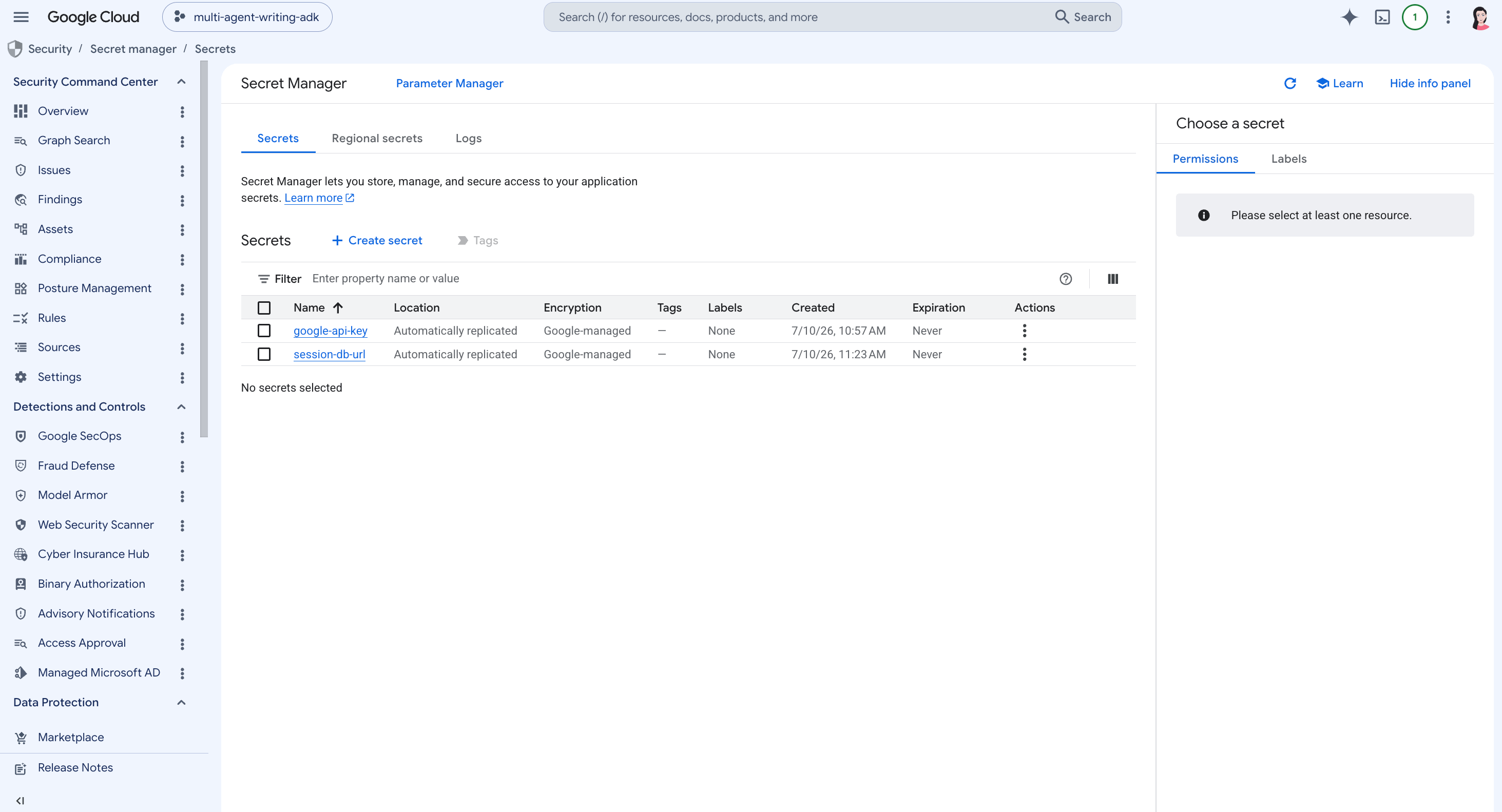
This page is used to verify that:
the selected model-provider key was created as a secret;
the session database URL exists when persistent sessions are enabled;
secrets are versioned;
Cloud Run has permission to access the required secrets.
A missing or inaccessible secret often appears later as a runtime error in Cloud Run logs. Secret Manager is therefore part of both deployment verification and debugging.
Cloud SQL
Cloud SQL appears only when persistent sessions are enabled.
Variable link: https://console.cloud.google.com/sql/instances?project=$PROJECT_ID
Demo project example: https://console.cloud.google.com/sql/instances?project=multi-agent-writing-adk
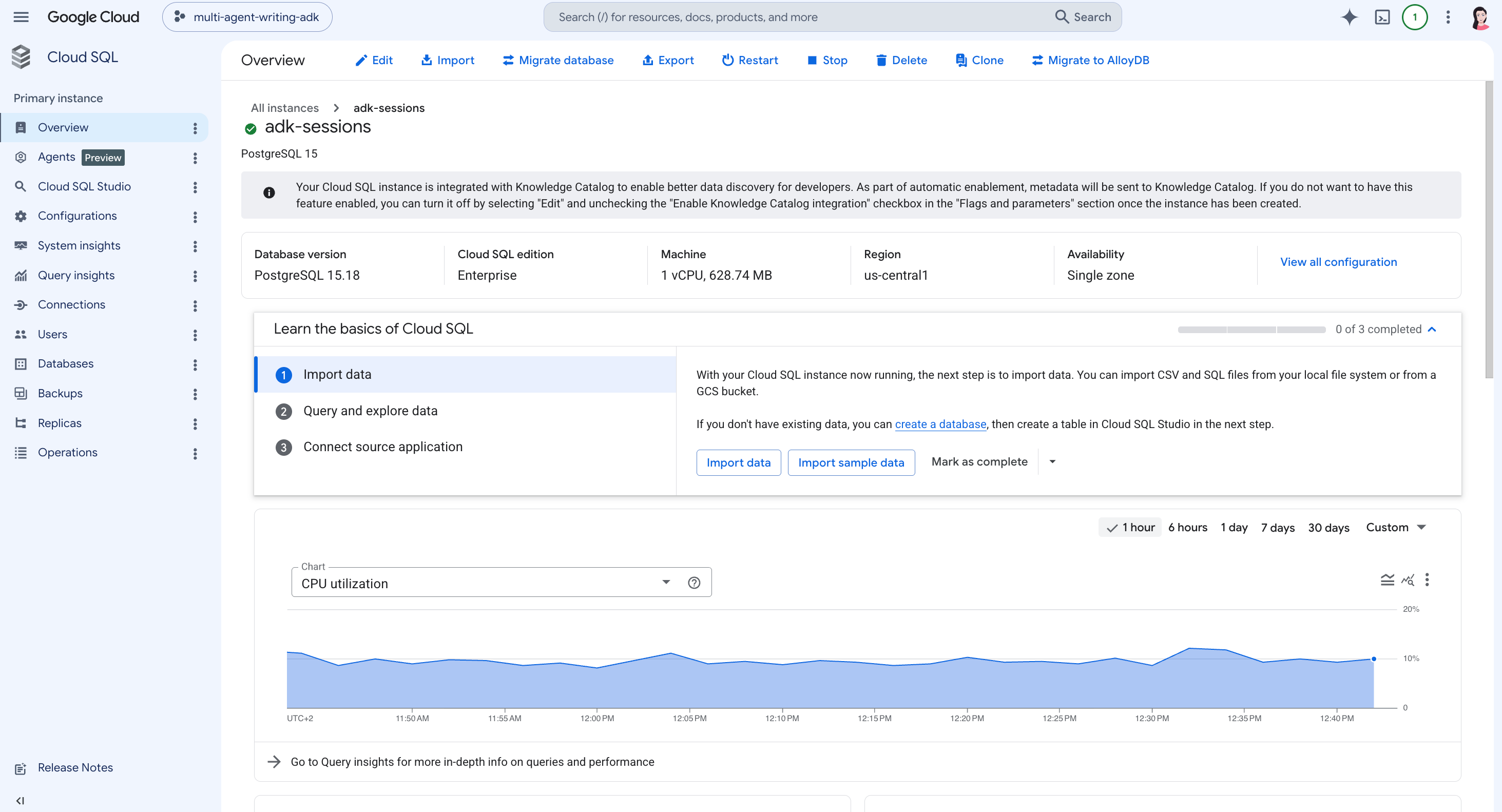
This page helps verify:
the PostgreSQL instance exists and is running;
the database version and machine type are correct;
CPU utilization and basic instance health are visible;
the instance region matches the deployment region;
the service has a database backend for sessions.
Cloud SQL also matters for cost. Unlike Cloud Run with min-instances=0, a database instance usually has a standing cost while it is running. If persistent sessions were enabled only for testing, the instance should be stopped or deleted after the demo.
3.3 What comes after the first deployment?
Once the agent is deployed, the next layer is about access, reliability, cost, and observability. These concerns are not specific to ADK; they apply to any agent exposed as a service. ADK provides useful deployment hooks, but the surrounding application architecture still has to be designed deliberately.
Frontend access and CORS
The ADK web UI is useful for validating the deployed service, but a production frontend is usually a separate application. It may run on a different domain, have its own authentication flow, and call the agent through browser code, a backend, or a gateway.
That introduces CORS, or Cross-Origin Resource Sharing. CORS is the browser security mechanism that controls whether a web application from one origin can call a service on another origin.
For example:
Frontend: <https://app.example.com>
Agent service: <https://writing-pipeline.run.app>
Even if the Cloud Run service is reachable, the browser may block the request unless the agent service explicitly allows the frontend origin.
ADK supports configuring allowed origins for the server. In production, this should be restricted to the real frontend domains, not opened broadly.
A safer product architecture is often:
Browser frontend
  ↓
Application backend / API gateway / Identity-Aware Proxy
  ↓
Cloud Run ADK service
  ↓
Models, tools, sessions, artifacts, memory
This keeps model keys, database URLs, and service credentials away from the browser while giving the product a controlled entry point.
Streaming responses
The ADK web UI is only one possible client. A custom frontend can also call the deployed ADK service and render streamed responses.
This matters because agent runs are rarely instant. A single request may involve planning, tool calls, model calls, retries, and multi-agent handoffs. Streaming makes that process visible to the user instead of hiding it behind a long wait.
A typical client flow is:
Create or reuse a session: keep the same user and session identifiers across turns.
Send the user message: call the deployed agent service from a trusted client or backend.
Stream the response: render intermediate and final events as they arrive.
Persist the result: store the conversation and generated outputs in the appropriate backends.
For a real product, the development UI should therefore be seen as a testing surface. The production client should own the user experience, authentication flow, and rendering of streamed events.
Observability
Cloud Run metrics and logs show the service-level picture: traffic, latency, errors, instance count, and revisions. That is necessary, but agent systems need another layer of visibility.
Important questions include:
Which model call failed?
Which tool call took the longest?
Did the session backend fail?
Did a retry loop increase latency or cost?
Was the run stopped by timeout, permissions, or model behavior?
Which step produced the final answer?
ADK can integrate with Google Cloud Trace, which helps inspect request flow and latency across agent execution. This is especially useful for long-running or multi-step agents, where a successful HTTP response may still hide a slow, expensive, or incomplete internal path.
Observability should therefore cover both levels:
Service observability: Cloud Run metrics, logs, revisions, and errors.
Agent observability: model calls, tool calls, intermediate steps, traces, session behavior, and cost drivers.
Framework limitations and architectural trade-offs
ADK’s strength is its Google Cloud-native path. It connects local agent development to Cloud Run, Agent Runtime, and GKE, making it a strong choice when the target environment is Google Cloud.
The trade-off is that ADK does not remove the need to design the surrounding production architecture. Authentication, frontend access, cost controls, observability, persistence strategy, and operational policy still need explicit decisions.
This is also where ADK differs from other frameworks.
LangGraph is more centered on graph execution, checkpointing, durable workflows, and state-machine control. It is a strong fit when the main challenge is explicit workflow control and recovery.
CrewAI is more centered on teams of agents, flows, memory, guardrails, and enterprise-style management of collaborative agents.
ADK is strongest when the goal is to build agents that integrate naturally with Google Cloud services and deployment targets.
The choice is therefore architectural, not only syntactic. ADK is a good fit when cloud deployment on Google Cloud is part of the design. For applications that require advanced graph-level durability, workflow replay, or packaged multi-agent operations, the surrounding architecture may need to be extended, or another framework may fit better.
Key Takeaways
✓ Production turns an agent into a service. Composing agents, tools, memory, and workflows is now the baseline. A deployed agent also needs a runtime, durable sessions, persistent artifacts, secure credentials, observability, and a safe path for clients to reach it.
✓ The runtime is the first decision, and Cloud Run is the balanced default. Agent Engine hides the most infrastructure, GKE exposes the most, and Cloud Run sits between them: a real HTTPS endpoint, container control, and autoscaling, while preserving the LiteLLM model swap.
✓ Deployment makes local assumptions explicit. Process lifetime, state location, credentials, filesystem durability, and client access all change once the agent runs in the cloud. Conversation state can no longer live in process memory.
✓ State is not one problem but four. Sessions preserve the conversation, artifacts preserve generated outputs, memory preserves cross-session context, and Secret Manager preserves credentials. Each has a different lifetime, risk profile, and backend.
✓ A running service still needs access control, streaming, and observability. CORS and a backend or gateway protect the endpoint, streaming surfaces long agent runs, and visibility has to cover both the service level (Cloud Run metrics) and the agent level (Cloud Trace).
✓ ADK’s strength is its Google Cloud-native path, not a finished architecture. It connects agent development to Cloud Run, Agent Runtime, and GKE, but authentication, cost control, persistence strategy, and observability still require deliberate design.
References
[1] Lina Faik, Google ADK Explained: Building Multi-Agent Systems, The AI Practitioner, 2026.
[2] Lina Faik, Google ADK: Multi-Agent Orchestration, The AI Practitioner, 2026.
[3] Lina Faik, multi-agent-writing-adk — Deployment Guide, GitHub, 2026.
[4] Google, Deploy to Cloud Run — Agent Development Kit, 2026.
[5] Google, ADK CLI Reference, 2026.
[6] Google Cloud, Build and Deploy an AI Agent to Cloud Run Using ADK, 2026.
[7] Google Cloud, Develop and Deploy Agents on Agent Runtime with ADK, 2026.
[8] Google Cloud, Deploy an Agentic AI Application in Google Kubernetes Engine with ADK and Vertex AI, 2026.
[9] Google Cloud, Secret Manager Documentation, 2026.
[10] Google Cloud, Cloud Trace Documentation, 2026.
[11] LangChain, LangGraph Overview, 2026.
[12] CrewAI, CrewAI Documentation, 2026.