
Google ADK Explained: Building Multi-Agent Systems With Google's Agent Development Kit (Part 1)
A Practical Introduction to Google's Code-First Agent Framework

This article is also available as a podcast! If you’re on the go or just want to absorb the content in audio format, you can listen to the full episode below 👇 The podcast is also available on Spotify and Apple Podcasts.

Building AI agents is no longer the hard part. Choosing the right framework is.
Every major AI lab now ships its own agent stack, each promising better orchestration, memory, tooling, and multi-agent workflows. The result is a crowded ecosystem where understanding the trade-offs matters more than understanding the technology itself.
Google entered the race in 2025 with the Agent Development Kit (ADK), joining frameworks such as CrewAI (2023) and LangGraph (2024). ADK is open source, code-first, built for multi-agent systems, and tightly integrated with Google’s ecosystem.
Objective
This article breaks down ADK from first principles: where it fits, how it compares to LangGraph and CrewAI, and the trade-offs behind its design. Along the way, we’ll dive into its core building blocks and build a small working agentic system to make the concepts concrete.
After reading this article, you will understand:
Where Google ADK fits in the agent framework ecosystem
How ADK models agents, tools, workflows, state, sessions, and memory.
How to build, observe, and debug a multi-agent workflow using ADK Studio.
Prerequisites. Familiarity with Python, basic LLM concepts, and the idea of tool-calling agents will be helpful.
Tools & libraries. The examples use Python, Google ADK, Gemini 2.5 Flash, and the local ADK Studio interface launched with
adk web.
You can find the code here on GitHub.
1. What Is Google ADK? Understanding the Framework and the Ecosystem
Before diving into the architecture, it helps to look at ADK from the outside: what it is, what it provides, and where it fits in the agent ecosystem.
1.1 A Code-First Framework for Agents
ADK is Google’s open-source framework for building, evaluating, and deploying AI agents [1]. Its core idea is simple: treat agents as software components rather than prompt workflows. Agents are defined as objects, tools are regular functions, and systems are composed like modules. The result is a framework that feels closer to application development than prompt engineering.
The framework comes with a fairly complete toolbox.
Multi-agent by design. Specialized agents can be composed into teams where each agent has a specific role, such as planning, execution, review, or routing [2].
Model-agnostic. ADK is optimized for Gemini, but it can also run other models and providers exposed through adapters such as LiteLLM [1].
Multi-language. Official SDKs are available for Python, Java, Go, and TypeScript [1], making ADK a better fit for teams outside the Python ecosystem.
Native A2A. ADK supports the Agent2Agent (A2A) protocol, allowing agents built with different frameworks and vendors to work together [4]. For example, an ADK agent could delegate a task to a LangGraph or a CrewAI agent without requiring framework-specific integrations. A2A provides a common language for agent-to-agent communication.
Developer tooling. The
adk webinterface exposes prompts, tool calls, and agent handoffs, making agent behavior easier to inspect and debug [6].Built-in evaluation. ADK includes an evaluation framework for testing agent behavior against predefined scenarios and detecting regressions as prompts, tools, or models change [6].
Structured context management. Sessions, memory, tool outputs, and artifacts are managed as structured context rather than raw chat history, helping agents remain efficient during long-running tasks [1].
Google has also expanded ADK’s scope. In 2026, it repositioned the framework as an agent execution layer with integrations into GitHub, Jira, MongoDB, and observability platforms [1]. The shift reflects a broader ambition: to make ADK the platform where agents are not only built, but also deployed, monitored, and operated at scale.
1.2 Strengths and Trade-offs
ADK’s strengths largely follow from its design philosophy. It treats agents as software systems rather than prompt chains, and that shows throughout the framework.
Multi-agent by design. Agent orchestration is a core abstraction, not an add-on. Teams of specialized agents, handoffs, delegation, and coordination are built into the framework from the start [6].
Strong developer experience. ADK provides one of the best debugging experiences in the ecosystem. The built-in UI exposes prompts, model requests, tool calls, state transitions, and agent handoffs, making complex workflows easier to understand and troubleshoot [6].
Interoperability. ADK has embraced the Agent2Agent (A2A) protocol early and aggressively. Features such as auto-generated Agent Cards make it easier to expose agents as services and connect them to agents built with other frameworks.
The trade-offs come from the same choices.
Opinionated architecture. ADK expects applications to follow a prescribed project structure and lifecycle. That convention can simplify development, but it also creates friction when projects fall outside the expected patterns [6].
Testing limitations. Agent systems are easier to test than in many frameworks, but sub-agents cannot currently be treated as fully independent units, which complicates isolated testing [6].
Multi-user complexity. The framework is designed around a shared root-agent model. Supporting strict per-user isolation typically requires additional infrastructure beyond what ADK provides out of the box.
Google ecosystem gravity. ADK itself is open and portable, but many of the smoothest deployment and operational paths lead through Google’s ecosystem. Teams already invested elsewhere may see less benefit from the surrounding platform.
Taken together, these trade-offs make ADK neither a universal choice nor a niche framework. It is strongest when you need structured multi-agent systems, strong observability, and production-oriented tooling. It is less compelling when simplicity, portability, or framework flexibility are the primary goals.
1.3 Positioning ADK in the Agent Framework Landscape
Positioning
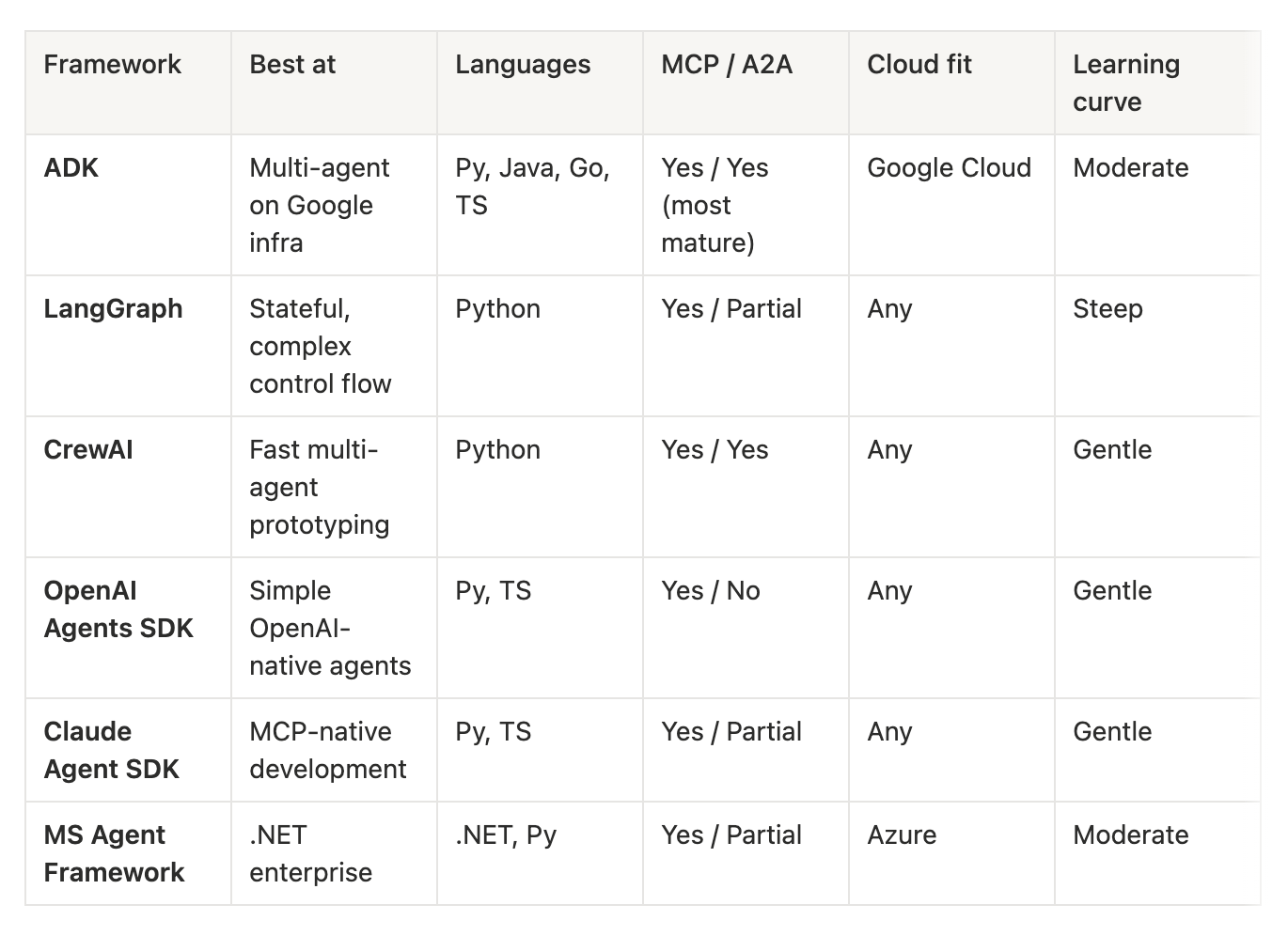
By 2026, the agent framework ecosystem had become crowded, but the major frameworks had started to differentiate. ADK’s niche is structured multi-agent systems backed by Google’s ecosystem. The table below compares it with the main alternatives.
Costs
The framework itself is free and open source under Apache 2.0. You can develop, test, and deploy locally while paying only for model usage. Costs appear when moving to managed infrastructure. Google’s managed runtime, Vertex AI Agent Engine, charges separately for compute and memory, which means costs can accumulate even when agents are waiting for work. Teams that want more control can deploy ADK to Cloud Run or any container platform.
Adoption
Adoption has grown quickly [8]. The Python repository passed 15,000 GitHub stars within months of launch and approached 20,000 by mid-2026. ADK is still young, but it has already become one of the most widely adopted agent frameworks.
2. Inside ADK: Building Blocks and Multi-Agent Patterns
The previous section explored what ADK is and where it fits in the agent ecosystem. Now it’s time to see how it works in practice.
To illustrate the framework’s key concepts, we’ll build a small multi-agent system from start to finish. The goal is an automated writing assistant that can produce and refine a short popular-science article without human intervention.
The workflow is straightforward. A topic is selected, an article is drafted, and the draft is reviewed. If improvements are needed, the article is revised and reviewed again. The process continues until the result is considered ready for publication.
Three agents participate in the workflow:
The theme agent selects a topic.
The writer agent drafts and revises the article.
The critic agent reviews the draft and decides whether further revisions are needed.
For example, the system might choose Why Is the Sky Blue?, generate a two-hundred-word article, receive editorial feedback, revise the text, and repeat the cycle until the critic approves the result.
This example is intentionally simple, but it introduces most of ADK’s core building blocks: agents, tools, state, workflows, and coordination.
2.1 Agents and Tools: The Core Building Blocks
The first step is defining the agents that will participate in the workflow.
Agent definition
At its core, an agent is a language model configured to perform a specific task.
The writer agent, for example, can be defined with a few lines of code:
from google.adk.agents import LlmAgent

writer_agent = LlmAgent(
    name="writer_agent",
    model="gemini-2.5-flash",
    instruction="You write short popular-science articles. Write about 200 words.",
    output_key="draft",
)
The definition contains the three core components of an ADK agent: a name, a model, and an instruction. Together, they define the agent’s identity, reasoning engine, and role. In this case, the role is straightforward: write a short popular-science article.
Tools
For some tasks, an instruction is all an agent needs. The writer receives a topic, generates a draft, and returns the result. Other tasks require capabilities that go beyond text generation. An agent may need to search the web, query a database, send an email, or trigger an action in the application itself. In ADK, these capabilities are exposed through tools.
ADK provides built-in tools such as Google Search and code execution, but the most common pattern is simpler: any Python function can be exposed as a tool and attached to an agent through the tools parameter.
The critic agent illustrates why this matters. Its job is not only to review the article but also to decide when the revision process should end. Once the draft reaches an acceptable quality level, the agent must stop the workflow and signal that no further revisions are needed.
A natural-language response is not enough. This is where a tool becomes necessary. By invoking a tool, the critic can communicate directly with the execution layer and change what happens next.
from google.adk.tools import ToolContext

def exit_loop(tool_context: ToolContext) -> dict:
    """Call this when the draft is good enough to publish."""
    tool_context.actions.escalate = True
    tool_context.actions.skip_summarization = True
    return {}

critic_agent = LlmAgent(
    name="critic_agent",
    model="gemini-2.5-flash",
    instruction=(
        "You are a sharp science editor. Review the draft.\n"
        "If it is clear, accurate, and engaging, call exit_loop.\n"
        "Otherwise, list specific, actionable fixes."
    ),
    tools=[exit_loop],
    output_key="critique",
)
Several details are worth highlighting.
Tool descriptions matter. The model decides whether to call a tool primarily from its name and description. In this example, the docstring “Call this when the draft is good enough to publish” effectively becomes the rule that governs tool usage. Well-written tool descriptions are often as important as well-written prompts.
ToolContextis injected by ADK. Unlike ordinary function arguments, it is not generated by the model. ADK automatically provides it when the tool is invoked, giving the function access to the current execution context and runtime controls.escalate = Truestops the workflow. Rather than generating a message saying the article is finished, the critic signals completion through the execution layer. The workflow reacts to that signal and exits the revision cycle.skip_summarization = Trueavoids unnecessary work. By default, ADK sends a tool’s output back to the model so it can generate a natural-language response. That behavior is useful when a tool returns information that must be explained to a user. In this case, the tool returns an empty dictionary and the workflow is ending anyway. Skipping summarization avoids an extra model call, reducing both latency and token usage.
2.2 Orchestrating Agents
ADK provides two broad approaches to orchestration. The first is deterministic orchestration, where the execution flow is defined explicitly in code. The second is dynamic delegation, where a model decides which agent should handle a task and how control should move through the system.
Deterministic orchestration is built around three workflow agents:
SequentialAgentexecutes its children in a fixed order.ParallelAgentexecutes its children concurrently.LoopAgentrepeatedly executes its children until a stopping condition is met or a maximum number of iterations is reached.
The writing assistant uses deterministic orchestration. The workflow follows a predefined sequence: a topic is selected, an article is written, and the article is reviewed. The writing and review steps are then repeated until the critic approves the result.
This behavior can be expressed with a SequentialAgent and a LoopAgent:
from google.adk.agents import LoopAgent, SequentialAgent

refinement_loop = LoopAgent(
    name="refinement_loop",
    sub_agents=[writer_agent, critic_agent],
    max_iterations=3,
)

root_agent = SequentialAgent(
    name="writing_pipeline",
    sub_agents=[theme_agent, refinement_loop],
)
The
SequentialAgentruns its children in order. It first executes the theme agent and then hands control to the refinement loop.The
LoopAgentexecutes the writer and critic repeatedly. Each iteration produces a draft and a review. The loop terminates when the critic invokesexit_loopor when the maximum number of iterations is reached.
The resulting hierarchy is:
root_agent (SequentialAgent)
├── theme_agent
└── refinement_loop (LoopAgent, ≤ 3 rounds)
    ├── writer_agent
    └── critic_agent → exit_loop
This tree defines the entire application. Running the root agent executes the complete workflow.
Dynamic delegation addresses a different class of problems. Instead of encoding the execution path in code, a coordinator agent decides which specialist should handle a task and routes requests accordingly. That approach is useful when the execution path depends on the input
2.3 State, Sessions, and Memory
The agents are now connected through a workflow, but they still need a way to share information. The writer needs access to the topic selected by the theme agent, and each revision must incorporate feedback from the critic. This is handled through ADK’s state management system.
ADK organizes information into three layers:
Session. A session represents a single execution of the application. It contains the history of the interaction as well as the state associated with that run.
State. State is a shared key-value store that lives within a session. All agents participating in the workflow can read from it and write to it. This is the primary mechanism through which agents exchange information.
Memory. Memory persists beyond a single session. While state is discarded when a run ends, memory can be searched and reused in future sessions. This is useful for applications that need long-term personalization or recall.
State
For the writing assistant, state is the most important layer. As the workflow executes, each agent stores its output under the key specified by output_key, making it available to the agents that run later in the workflow.
# after theme_agent runs
{"topic": "Why the sky is blue"}

# after writer_agent runs
{
    "topic": "Why the sky is blue",
    "draft": "The sky is blue because..."
}

# after critic_agent runs
{
    "topic": "...",
    "draft": "...",
    "critique": "Define scattering for a lay reader."
}

# after the next writer iteration
{
    "topic": "...",
    "draft": "The sky is blue because of a process called...",
    "critique": "..."
}
Reading from state is done through instruction templating. Values stored in state can be referenced directly inside an agent’s instruction using braces.
Write a short article about {topic}.
Optional values can be referenced using a question mark:
If a critique of your previous draft exists below, treat it as a checklist and address every point in your rewrite.\n"
{critique?}
If critique exists, its value is inserted. Otherwise, nothing is added. This allows a single instruction to handle both the first draft and subsequent revisions.
Session
State is where agents exchange information. A session is the container that holds it.
In the writing assistant, a session represents a single execution of the pipeline. It contains the event history of the run together with its state: the selected topic, successive drafts, critiques, and any other values produced along the way.
Sessions are managed through a SessionService. During development, the most common choice is the in-memory implementation. The same application can later be backed by a database or a managed service without changing the agent definitions.
from google.adk.sessions import InMemorySessionService
from google.adk.runners import Runner

session_service = InMemorySessionService()

runner = Runner(
    agent=root_agent,
    app_name="writing_assistant",
    session_service=session_service,
)

await session_service.create_session(
    app_name="writing_assistant",
    user_id=USER_ID,
    session_id=session_id,
)

async for event in runner.run_async(
    user_id=USER_ID,
    session_id=session_id,
    new_message=start,
):
    ...
Each execution of the pipeline runs inside a session. When the run completes, the final article remains available through the session state:
session = await session_service.get_session(
    app_name="writing_assistant",
    user_id="lina",
    session_id="run_1",
)

print(session.state["draft"])
The distinction between session and state is simple. State stores the data. The session stores both the data and the history of how that data was produced.
Memory
A session lasts for a single run. Once the run ends, its state is discarded. Memory is the layer that persists across sessions, allowing information from previous runs to be retrieved later. In the writing assistant, memory could keep a record of previously generated articles, enabling the theme agent to choose topics that have not been covered before.
Memory consists of two operations: storing information from completed sessions and retrieving it later.
Storing information
Completed sessions can then be archived automatically into memory:
async def archive_run(callback_context):
    await callback_context.add_session_to_memory()
    return None
Retrieving memory
The retrieval side can be exposed to agents through tools such as load_memory:
from google.adk.tools import load_memory

theme_agent = LlmAgent(
    name="theme_agent",
    model=MODEL,
    instruction=(
        "Pick a topic for a short popular-science article. "
        "Use the 'load_memory' tool to check which topics were already "
        "covered, and choose a new one."
    ),
    tools=[load_memory],
    output_key="topic",
)
As with sessions, the storage backend is swappable. InMemoryMemoryService keeps everything in memory for local development, while managed services such as Vertex AI Memory Bank can process completed sessions into searchable memories in production. The agent code remains unchanged.
3. Exploring ADK Studio: Observing & Debugging Agent Workflows
One of ADK’s strengths is that observability is built directly into the framework. Running adk web provides a unified interface for inspecting workflows, agent interactions, tool calls, state updates, and execution traces.
3.1 Events: What Happened During the Run
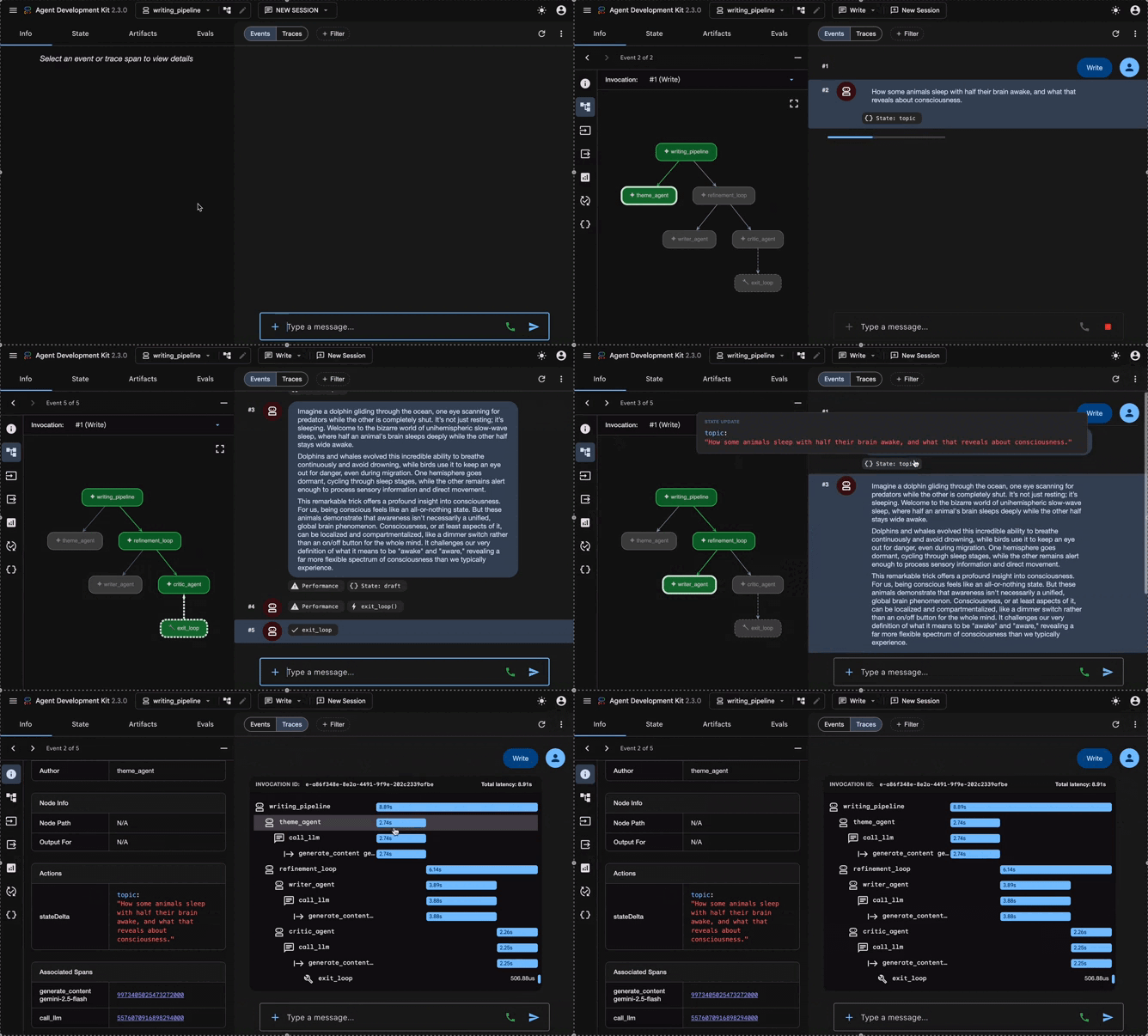
ADK Studio frames debugging around two complementary perspectives: what occurred during the run, and how the execution unfolded internally. The right side of the interface captures this distinction through two views: Events and Traces.
The Events view focuses on the observable sequence of the session. It presents the run as a chronological record of messages, agent outputs, tool invocations, state updates, and control signals.
In the writing assistant example, selecting Event 3 of 5 reveals the output produced by writer_agent: the draft article generated from the topic previously selected by theme_agent. The Events view is therefore the most direct way to examine the contribution of each agent and understand how the workflow progressed from one step to the next.
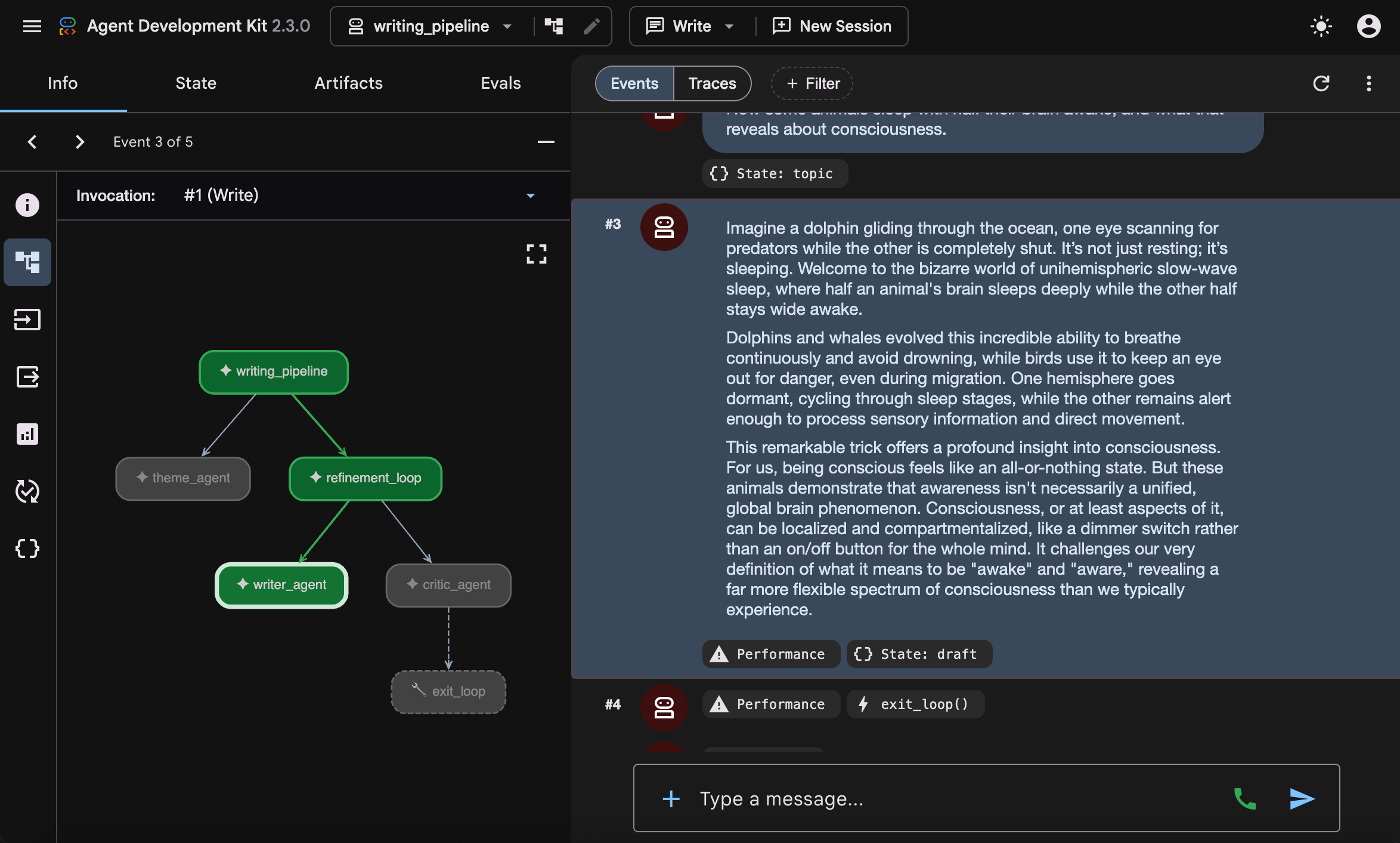
This view is particularly useful when debugging prompt behavior. If the writer fails to incorporate the critic’s feedback, the corresponding event exposes the exact draft that was produced. If the critic invokes exit_loop prematurely, the Events view reveals the review that triggered the stop condition. Rather than inferring the cause from logs or final outputs, the execution can be reconstructed step by step from the artifacts that shaped each subsequent action.
3.2 Traces: How the Run Was Executed
The Traces view shifts the focus from outputs to execution. While Events reconstruct what the agents produced, Traces reveal how the workflow unfolded internally.
A trace decomposes the run into nested execution steps: the root agent, its sub-agents, model calls, tool invocations, and workflow-control actions. Each step is associated with timing information, making the trace both a structural view of the workflow and a performance profile of the run.
In the screenshot, the full writing_pipeline takes around nine seconds to complete. Beneath it, the trace expands into the theme_agent, the refinement_loop, the writer_agent, the critic_agent, and the exit_loop tool call. This nesting makes the execution path explicit: it shows not only which components ran, but also how control passed from one part of the system to the next.
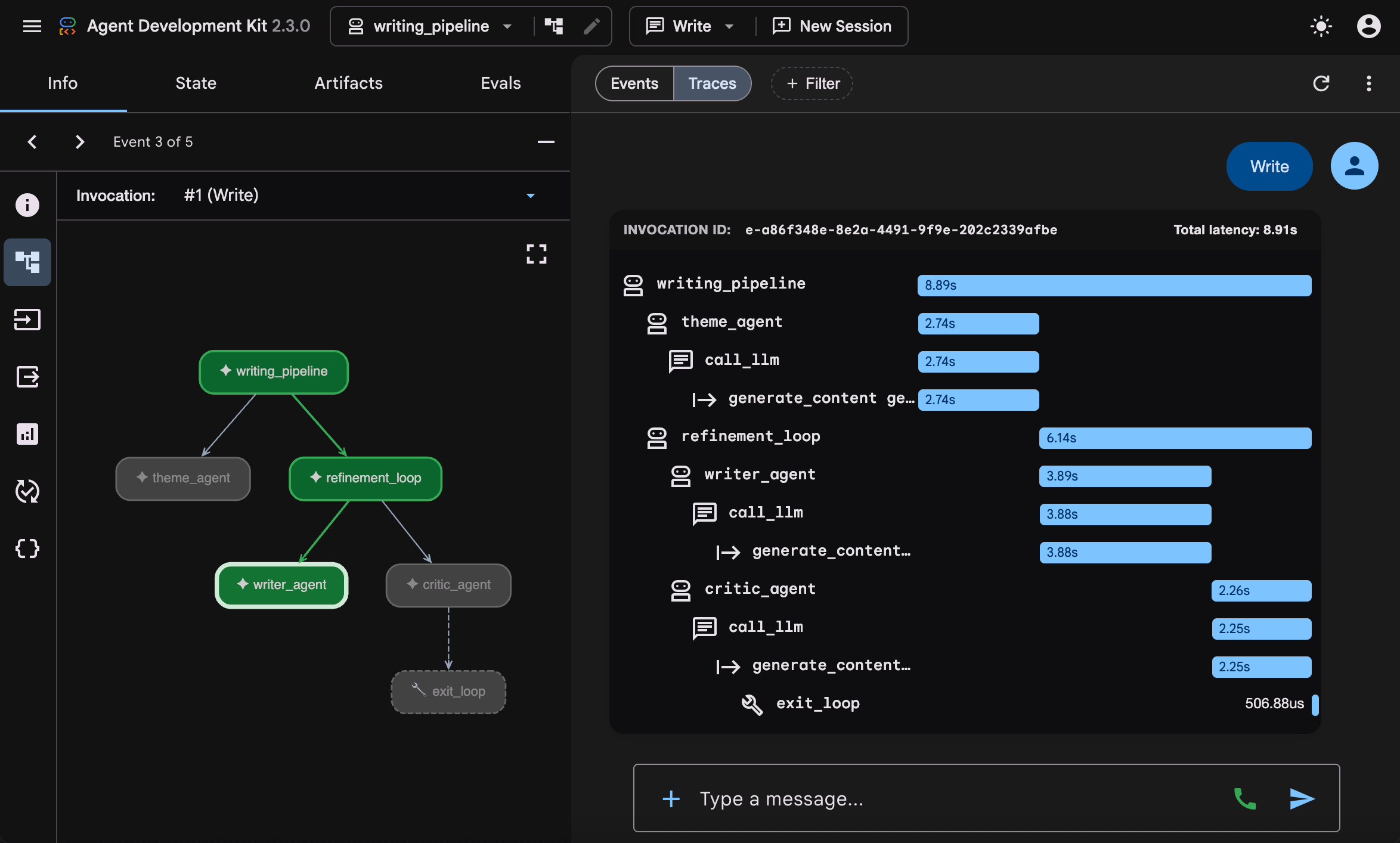
This view is particularly useful when debugging orchestration. A slow workflow can be traced back to the step that consumed most of the latency. An unexpectedly long loop can be inspected iteration by iteration. An unexpected tool call can be located in context, alongside the agent action that triggered it. Traces therefore make the internal mechanics of a multi-agent system observable, rather than leaving them hidden behind the final response.
3.3 The Inspection Panel: Graph, State, Artifacts, and Evals
After Events and Traces, the left inspection panel provides the broader context needed to interpret a run. It does not replace the execution timeline; instead, it explains the structure and runtime data behind it.
The panel is organized into four tabs: Info, State, Artifacts, and Evals.
The Info tab shows the agent graph. In the writing assistant example,
writing_pipelineis the root agent. It first delegates totheme_agent, then entersrefinement_loop, which containswriter_agentandcritic_agent. Theexit_looptool appears undercritic_agentbecause it is the tool the critic can invoke to stop the revision cycle.Above the graph, the event stepper indicates the current position in the session. In the screenshot, the interface is on Event 3 of 5. As the event selection changes, the graph highlights the corresponding part of the workflow. At event 3,
writer_agentis active because this is the step where the draft is produced.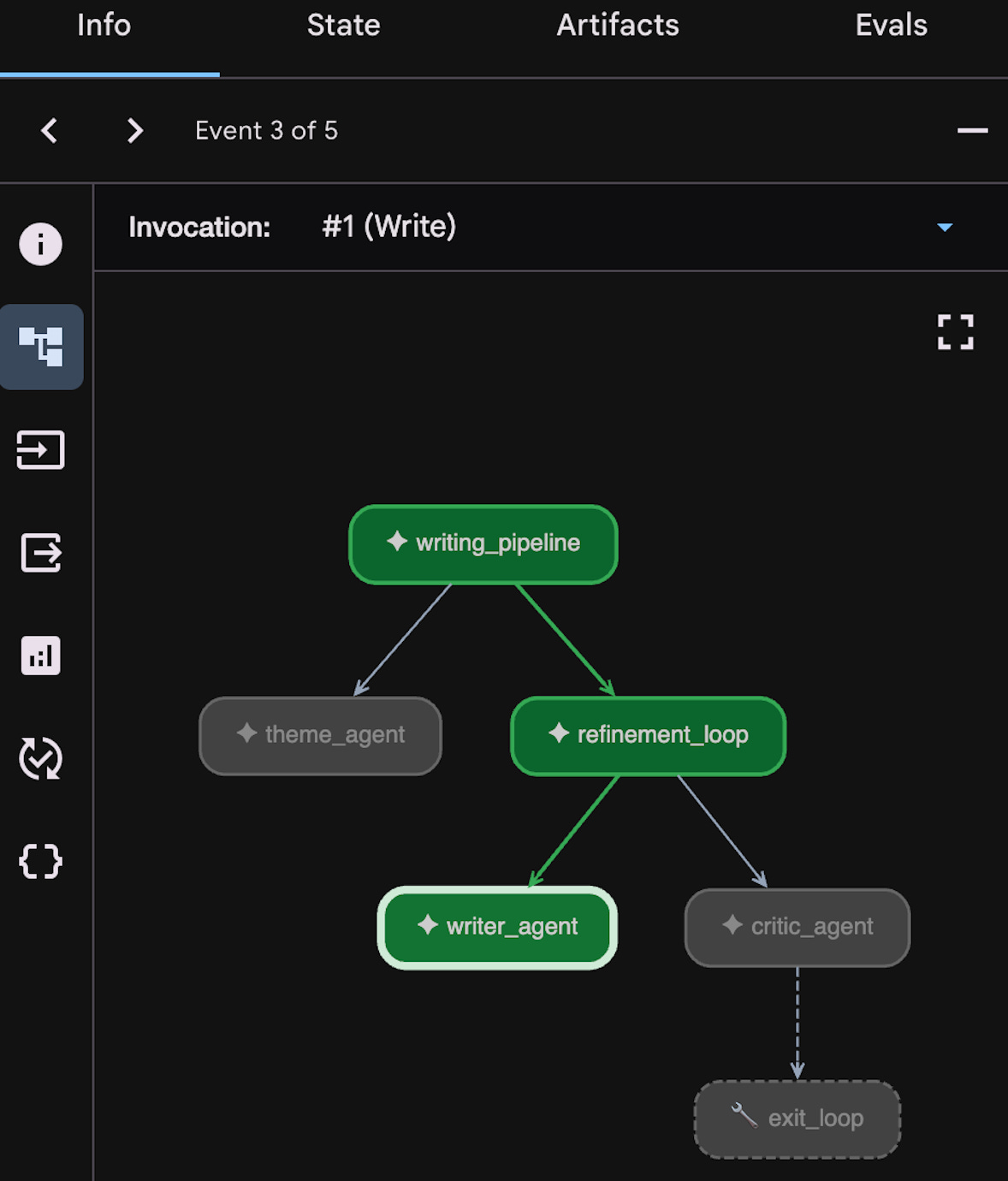
The State tab exposes the session’s shared key-value store. This is where values such as
topic,draft, andcritiqueappear as agents write their outputs. In this workflow, each agent stores its result under the key defined by itsoutput_key, allowing later agents to reuse it without passing messages manually.The Artifacts tab contains files or binary outputs produced during the session, such as generated documents, images, audio files, or other saved outputs.
The Evals tab connects debugging with testing. It allows the current session to be saved as an evaluation case, added to an eval set, and checked against evaluation metrics such as tool-use trajectory and response match. This is useful when a run represents a behavior that should be preserved: for example, the critic stopping the loop only after the draft meets the expected quality threshold.
3.4 ADK Studio vs. LangGraph Studio
This debugging experience is not unique to ADK. LangGraph Studio also provides a strong environment for visualizing and debugging agent workflows. The difference is conceptual: each studio reflects the framework’s execution model.
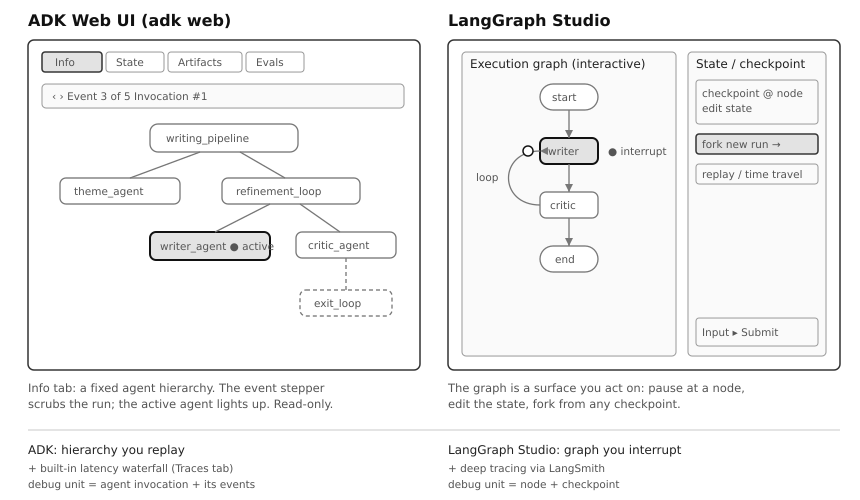
ADK Studio replays an agent hierarchy. The Info tab shows the agent tree defined in code, while the event stepper highlights which agent is active at each step. The graph is mainly an inspection surface: it shows structure, progress, and agent participation. The Traces tab complements this with latency and execution details.
LangGraph Studio exposes a graph to intervene in. Because LangGraph models workflows as checkpointed state graphs, its studio allows execution to be paused, state to be inspected or edited, and new runs to be forked from earlier checkpoints. Deeper tracing is typically handled through LangSmith.
In short, ADK Studio is organized around replaying agent activity, while LangGraph Studio is organized around controlling graph execution. Both are development tools, not end-user interfaces.
For a deeper treatment of LangGraph’s execution model and tooling, see the LangGraph series on aipractitioner.substack.com. Part 1 is the best place to start.
Key Takeaways
✓ ADK is best understood as an agent-centric framework. It treats agents as software components, tools as regular functions, and workflows as composable objects. That makes it feel closer to application development than to prompt chaining.
✓ ADK niche is structured multi-agent systems on Google’s ecosystem. ADK is strongest where orchestration, observability, and production tooling matter. It is less compelling when simplicity, portability, or framework flexibility come first. A serious option, not a universal default.
✓ A few building blocks express most workflows. Sequential, parallel, and loop agents cover the common cases: running steps in order, fanning work out, and repeating until a result is good enough. The agents never call each other directly. Instead, each one writes its output to a shared state that the next agent reads from.
✓ Observability is built in, and it mirrors the execution model. ADK Studio replays an agent hierarchy event by event, through Events, Traces, and an inspection panel for graph, state, and evals. LangGraph Studio, by contrast, allows a state graph to be interrupted and forked. Each studio reflects how its framework runs.
References
[1] Agent Development Kit Documentation, Google, 2026.
[2] Developer’s Guide to Multi-Agent Patterns in ADK, Google Developers Blog, 2025.
[3] Remember This: Agent State and Memory with ADK, Google Cloud Blog, 2025.
[4] A2A Protocol Specification, Linux Foundation, 2025.
[5] N. Madaan et al., Self-Refine: Iterative Refinement with Self-Feedback, arXiv:2303.17651, 2023.
[6] Google ADK Review, Awesome Agents, 2026.
[7] Workflow Agents: Loop and Sequential, Agent Development Kit Documentation, 2026.
[8] The Best Open Source Frameworks for Building AI Agents in 2026, Firecrawl, 2026.