
Claude Dynamic Workflows: Scaling Complex Work Through Orchestration
A Deep Dive Into Claude's Multi-Agent Orchestration Framework

This article is also available as a podcast! If you’re on the go or just want to absorb the content in audio format, you can listen to the full episode below 👇 The podcast is also available on Spotify and Apple Podcasts.

Large Language Models (LLMs) have become remarkably capable at solving individual tasks. However, many real-world problems are not single tasks. They are workflows composed of multiple interconnected steps that require planning, parallel execution, validation, and iterative refinement. For example, writing a comprehensive research report, reviewing a large codebase, or building an end-to-end application often involves coordinating multiple specialized tasks rather than a single model call.
To address this challenge, Anthropic introduced Claude Dynamic Workflows on May 28, 2026, a multi-agent orchestration framework that enables Claude to decompose complex objectives into smaller specialized tasks, coordinate multiple agents, and synthesize their outputs into a coherent final result.
Rather than relying on a single model invocation, dynamic workflows transform Claude into a system capable of managing sophisticated processes that resemble human teams working together.
Objective
This article explores Claude’s dynamic workflow architecture, explaining where it fits in Claude Code, how multiple agents coordinate to solve complex tasks, and the best practices for designing scalable multi-agent systems.
After reading this article, you will understand:
Where dynamic workflows fit in Claude Code and when orchestration is a better choice than a single-agent approach.
How a dynamic workflow actually works, from task decomposition and parallel execution to result synthesis.
How to apply dynamic workflows in practice, including design patterns, best practices, and common pitfalls.
Throughout the article, we’ll follow a single example: a deep research workflow tasked with answering a contested research question and producing a comprehensive report. This example will illustrate how multiple agents collaborate to investigate, analyze, validate, and synthesize information at scale.
Prerequisites: No prior knowledge is required. Familiarity with Claude or LLM concepts is a plus.
Tools & libraries: Claude Code v2.1.154 or later
You can find the run artifacts and scripts here on GitHub.
1. From Single Agents to Workflows: Understanding the Coordination Ladder
Workflows only make sense once the limits of a single agent become visible. The distinction is not primarily about model capability. A sufficiently capable agent could, in principle, perform every step of a complex research task. The challenge lies elsewhere: maintaining focus across long horizons, preserving quality, and coordinating large amounts of work without overwhelming a single context window.
Claude Code already provides several mechanisms for extending an agent beyond a single prompt. Workflows are the most structured of these mechanisms, but they are not the first tool to reach for. Understanding where they fit requires understanding the progression from a single agent to increasingly explicit forms of coordination.
1.1 The Limits of a Single Agent
A single agent can search, read, analyze, and write within one context window. For many tasks, that is enough.
As the scope grows, however, three failure modes appear repeatedly [2].
Agentic laziness. The agent stops before the work is actually complete. It gathers enough evidence to construct a plausible answer and then declares success, even though important portions of the search space remain unexplored [2].
Self-preferential bias. The same agent produces the output and evaluates its quality. Summaries often appear persuasive to the system that generated them, making self-review less reliable than independent review [2].
Goal drift. Long-running tasks gradually lose fidelity to the original objective. After multiple rounds of summarization, context compaction, and intermediate reasoning, requirements that were explicit at the beginning become implicit or disappear altogether [2].
These failures are difficult to eliminate through prompting alone because they arise from the structure of the task. The question, then, is how to overcome these limitations without simply adding more prompts.
1.2 Four Ways to Coordinate Work in Claude Code
Claude Code offers four increasingly powerful ways of coordinating multi-step work [1].
Skills package reusable expertise. They capture instructions, conventions, and best practices that can be applied repeatedly across different tasks [1]. For more details, explore my previous article: *Building Claude Skills: A New Paradigm for Interacting with LLMs.*
Subagents provide delegation. A parent agent can offload a focused piece of work to a worker and receive the result when it finishes [1].
Agent teams introduce supervision. A lead agent coordinates multiple long-running peers, assigns work, and manages collaboration among them [1].
Workflows move coordination into code. The sequence of steps, branching logic, retries, and data flow are defined explicitly by a script rather than being managed through conversation [1].
The key distinction is not the number of agents involved but where the plan lives.
With skills and subagents, the plan remains in Claude’s context window. An agent decides what to do next and incorporates every result into its ongoing reasoning. Agent teams extend this model by allowing a lead agent to coordinate several peers, but the orchestration still lives inside an agent’s decision-making process [1].
A workflow shifts orchestration into software. The script determines what runs next, what information is preserved, what information is discarded, and how results move between stages. Agents perform work, but the workflow governs the process.
This separation is what makes large-scale, repeatable coordination possible.
1.3 The Escalation Ladder
These mechanisms are best understood as a progression rather than a set of competing alternatives.
Just ask. A single prompt remains the simplest and cheapest solution whenever a task fits comfortably within one context window [1].
Skill. Reusable expertise becomes valuable when the same standards or procedures should apply repeatedly.
Subagent. Delegation becomes useful when isolated investigations would otherwise clutter the main context.
Agent team. Supervision becomes valuable when several parallel efforts need ongoing coordination over a longer horizon [1].
Workflow. Explicit orchestration becomes worthwhile when the coordination pattern itself should be repeatable or when the scale exceeds what a conversational coordinator can comfortably manage [1].
Each step upward introduces additional coordination overhead, additional token consumption, and additional complexity. The goal is therefore not to maximize sophistication. The goal is to introduce only as much coordination as the task requires.
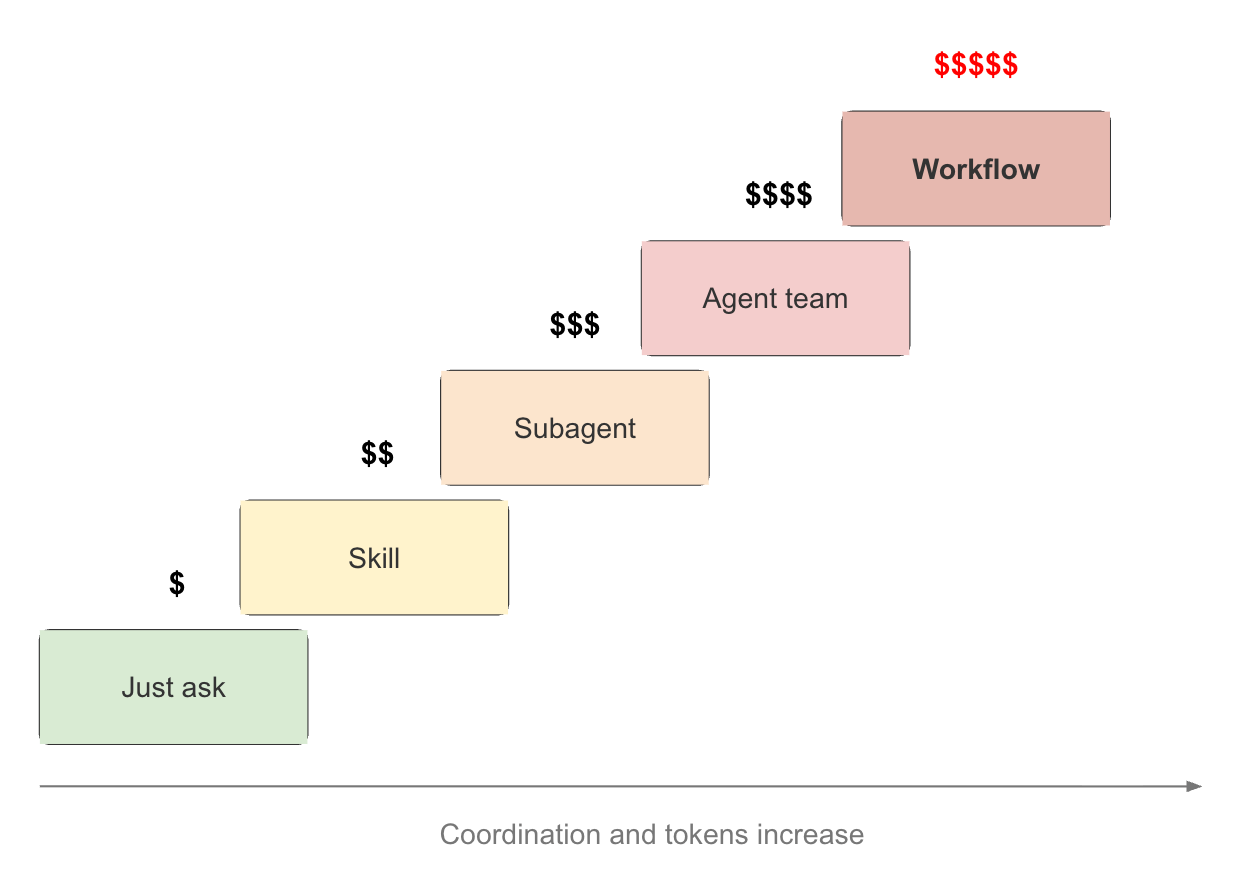
Workflows sit at the top of this ladder because they solve a different problem from the other mechanisms. They do not simply add more agents. They make the coordination process itself programmable.
1.4 Isolation, Communication, and Composition
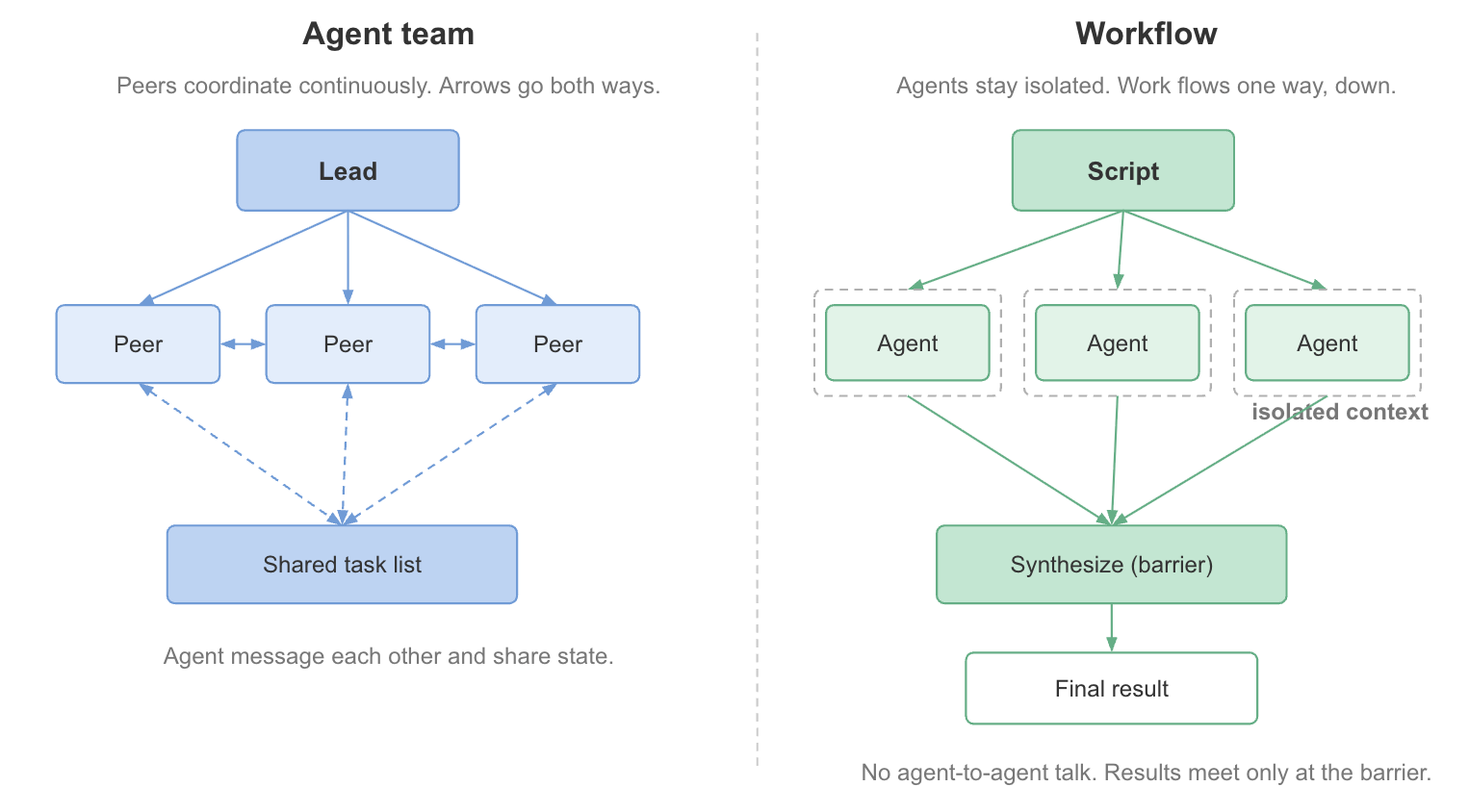
One of the most important differences between agent teams and workflows lies in how information moves through the system.
In an agent team, coordination is an active process. A lead agent supervises multiple peers, work is assigned dynamically, and information can flow between participants through a shared task structure [1].
A workflow follows a different philosophy. Individual agents are typically isolated from one another. Each receives a specific objective, performs its work independently, and returns a structured result. The workflow script is responsible for routing information and deciding when separate streams of work should be combined [2].
This isolation is not a limitation. It is often the source of the workflow’s reliability. Independent researchers cannot accidentally influence one another’s conclusions. Reviewers can critique outputs without inheriting the assumptions that produced them. Parallel investigations remain genuinely parallel until a dedicated synthesis stage merges the results [2].
Workflows also compose naturally with the mechanisms below them. They can invoke subagents, apply skills, select different models, and run in isolated worktrees. Conversely, they can be packaged and distributed as part of a skill, allowing an entire orchestration pattern to become a reusable capability [2].
2. Inside a Dynamic Workflow: Planning, Execution, and Coordination
Consider the research task introduced earlier:
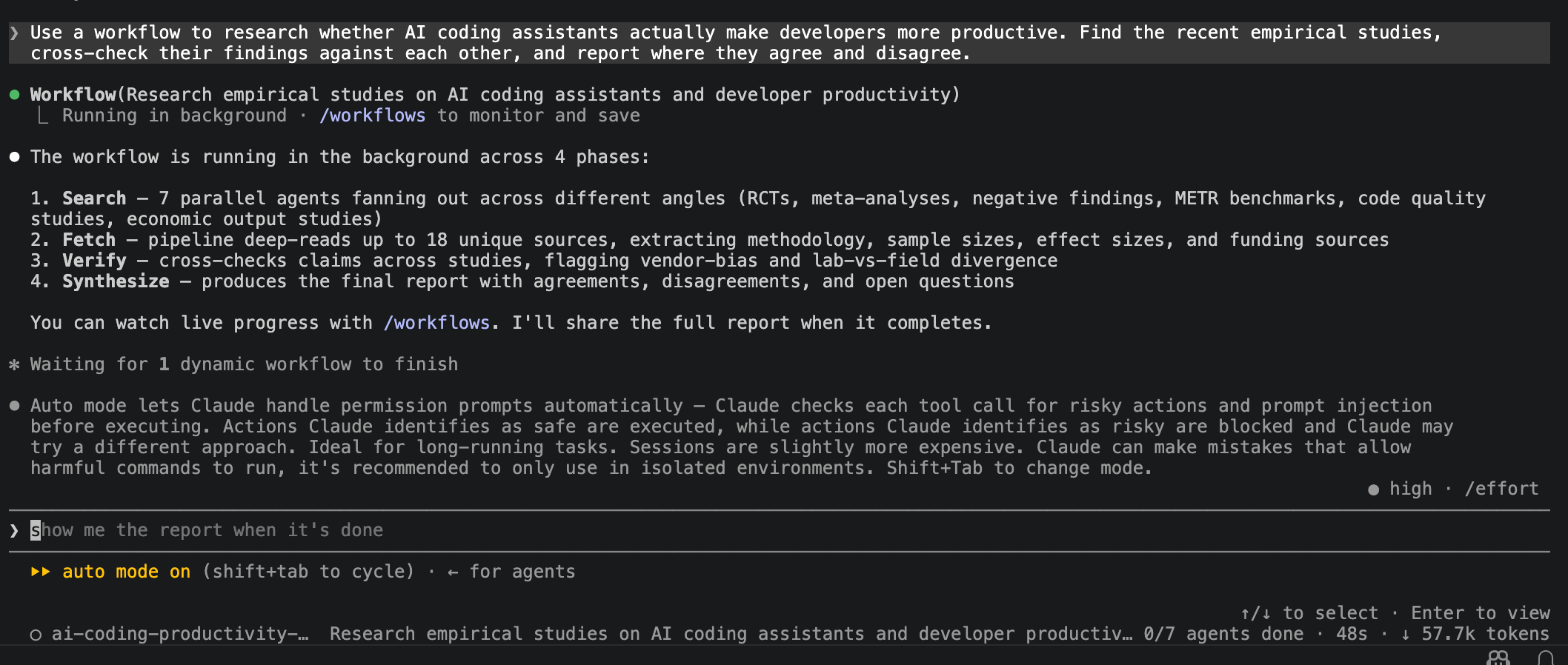
Use a workflow to research whether AI coding assistants actually make developers more productive. Find the recent empirical studies, cross-check their findings against each other, and report where they agree and disagree.
At first glance, this seems like a straightforward research request. In reality, it involves multiple jobs: finding studies, extracting findings, comparing methodologies, identifying disagreements, and synthesizing conclusions. The challenge is less about generating a summary than coordinating all that work without losing rigor.
That is exactly the kind of problem workflows are designed to solve.
2.1 What Happens When a Workflow Is Triggered?
A workflow can be triggered explicitly by mentioning the word workflow in a prompt, as in the productivity-research example above.
It can also be triggered implicitly by enabling ultracode though ****/effort menu, which allows Claude to decide when a task is large or complex enough to warrant workflow orchestration [1].
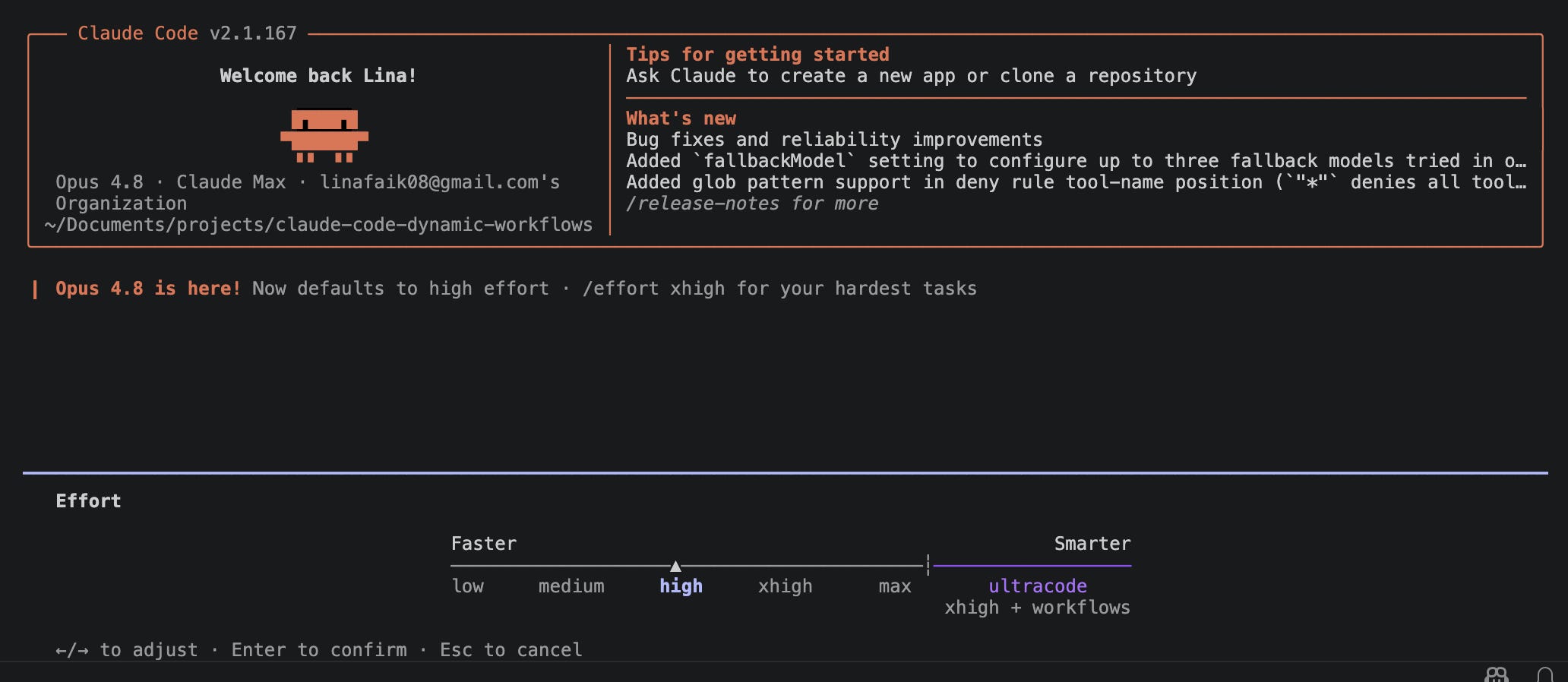
/effort menu showing ultracode and workflow support.The first artifact produced by a workflow is not a report but a program.
In a normal Claude Code session, planning and execution happen inside a single context window. A workflow takes a different approach. Claude first generates a JavaScript program that describes how the task should be carried out: which phases are needed, what can run in parallel, where verification should occur, and how the results should be combined. The generated workflow can be inspected before execution.
The script becomes the source of truth for the run. It contains the phases, branching logic, loops, synchronization points, and decisions about how many agents to spawn. Intermediate results remain in the workflow’s runtime state rather than accumulating in the conversation history. Only the outputs needed by later stages, or the final answer, are surfaced back to Claude’s context window [1].
The complete example produced for the productivity-research task is available here. It creates separate phases to discover studies, extract findings, compare methodologies, verify conclusions, and synthesize the final report. Each phase can use multiple agents operating in parallel without requiring a single context window to hold every intermediate result.
This separation between orchestration and execution is what makes workflows scale. The runtime currently supports up to 16 concurrent agents and 1,000 agents in total [1].
Before execution begins, Claude presents the generated workflow for approval. The approval card summarizes the planned phases, highlights potential token usage, and provides a View raw script option for inspecting the generated JavaScript [1].
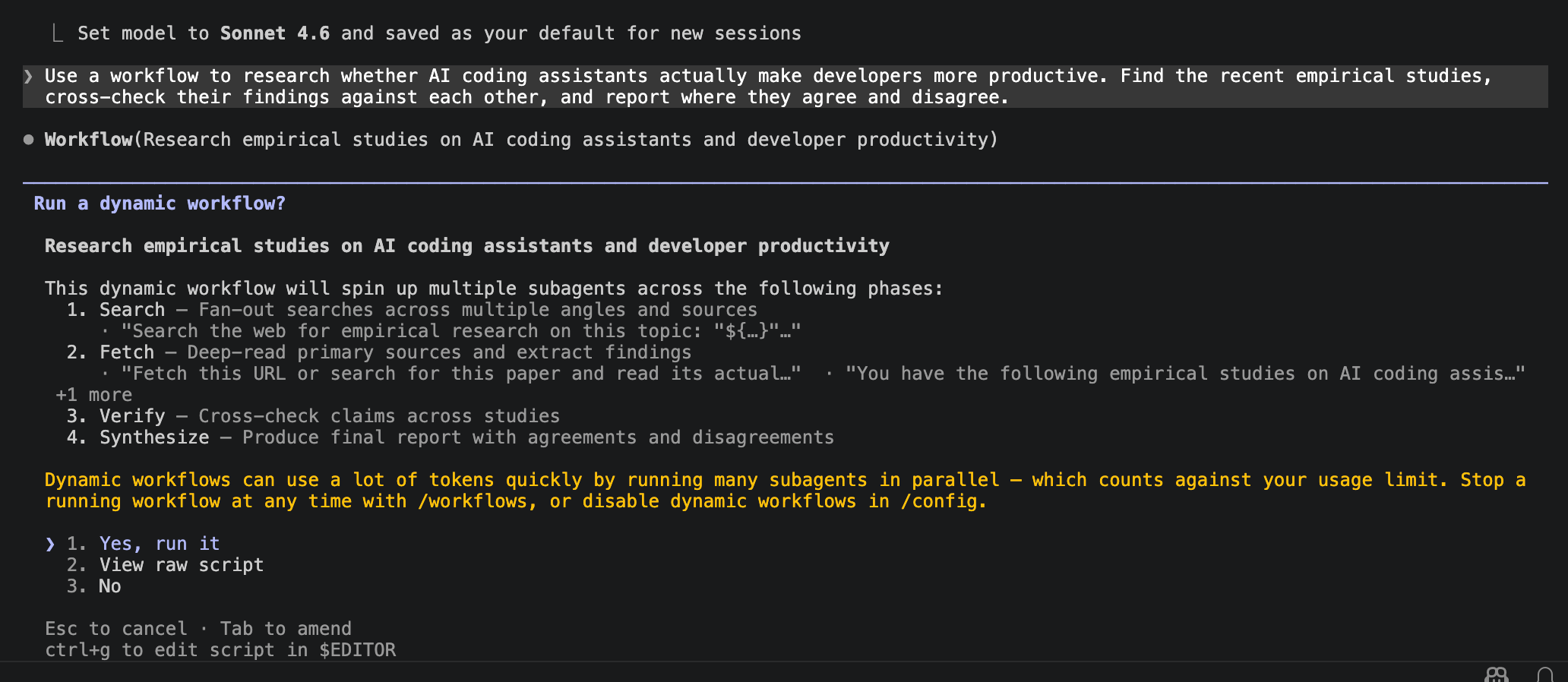
The script itself has no direct access to files, shells, or tools. Instead, it coordinates agents that perform those actions on its behalf. The workflow acts as the orchestrator; the agents perform the actual work. If execution is interrupted, resuming the same session allows the workflow to continue from where it left off rather than starting over [1].
2.2 Where Do Workflows Fit Alongside Static Workflows, /goal, and /loop?
Three features are similar enough to workflows that they are worth distinguishing.
Static workflow
A static workflow has a predefined structure. Whether built with the Agent SDK,
claude -p, LangGraph, CrewAI, or custom orchestration code, the sequence of steps, branching logic, and agent interactions are specified ahead of time and reused across tasks.A dynamic workflow is generated for the task at hand. Instead of selecting a predefined orchestration, Claude creates one specifically for the problem being solved, producing a JavaScript workflow tailored to the request [1][2].
Example: To answer the productivity-research question, a static workflow might always create the same sequence of search, analysis, and synthesis steps. A dynamic workflow can decide, for example, how many search agents to launch, whether additional verification is needed, or how findings should be grouped before synthesis.
/goal and /loop
/goal and /loop solve different problems altogether. A workflow defines how work is organized and executed. /goal defines when the work is considered complete, while /loop defines when it should run again [2].
/goalestablishes a completion condition, meaning a definition of done that Claude must satisfy./looprepeats a task on a schedule or until a condition is met, making it useful for recurring reviews, monitoring, or verification passes.
These features complement workflows rather than compete with them. A workflow can coordinate dozens of research agents, a /goal can require agreement across sources before the task is considered complete, and a /loop can rerun the process periodically as new studies appear.
In other words, the workflow is the process, /goal is the completion criterion, and /loop is the repetition mechanism.
2.3 Six Patterns That Power Most Workflows
Although workflows are generated dynamically, they tend to be built from a small number of recurring coordination patterns [2]. These patterns are useful because they provide a vocabulary for describing how work should be organized. Once the shape of a task becomes clear, it can often be requested directly in the prompt.
1. Classify and act. A lightweight agent classifies each item and routes it to the appropriate handler.
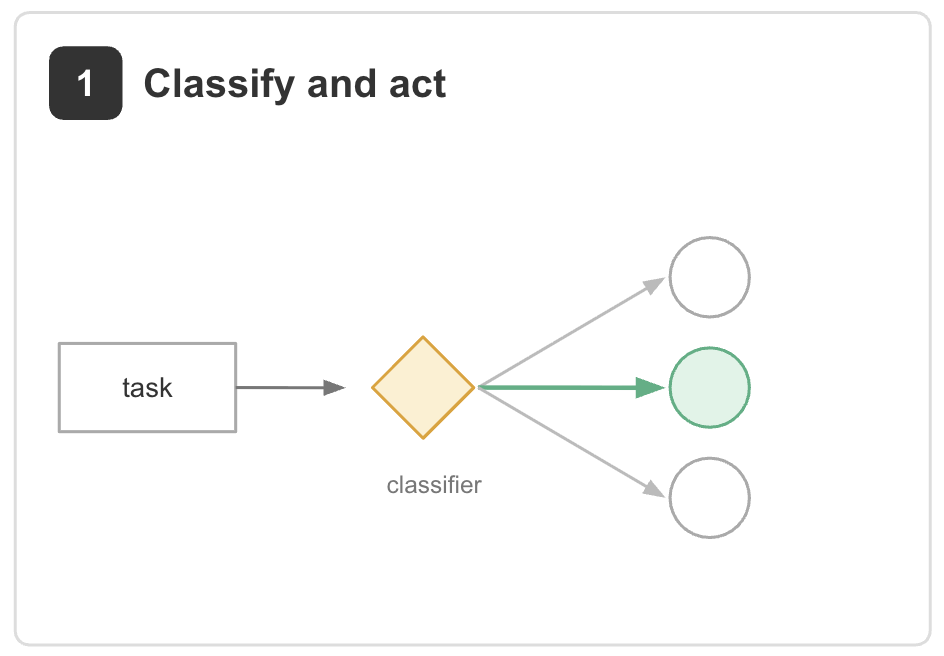
Example: an inbox workflow that labels each ticket as a bug report, refund request, upgrade inquiry, or spam, then forwards it to a specialized agent for action [2].
2. Fan out and synthesize. A task is split into independent pieces, one agent works on each piece in its own context, and a synthesis step combines the results.
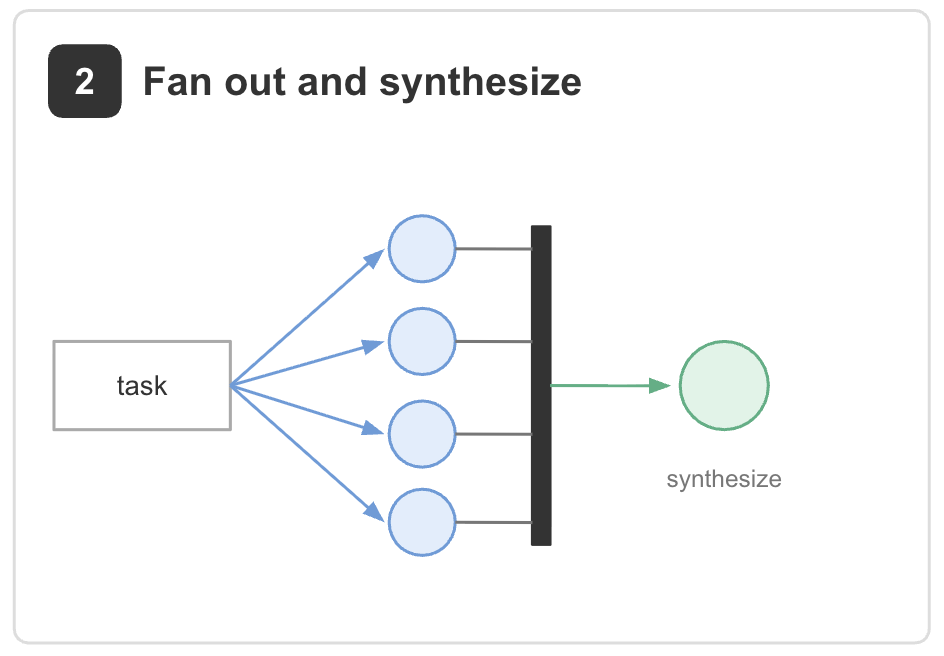
Example: the productivity-research workflow. Multiple agents search for empirical studies in parallel, then a synthesis phase combines the findings into a single evidence map. The same pattern appears in due diligence workflows, where separate agents review different parts of a data room before a final report is assembled [2].
3. Adversarial verification. One set of agents produces results while another set attempts to challenge them against a rubric.
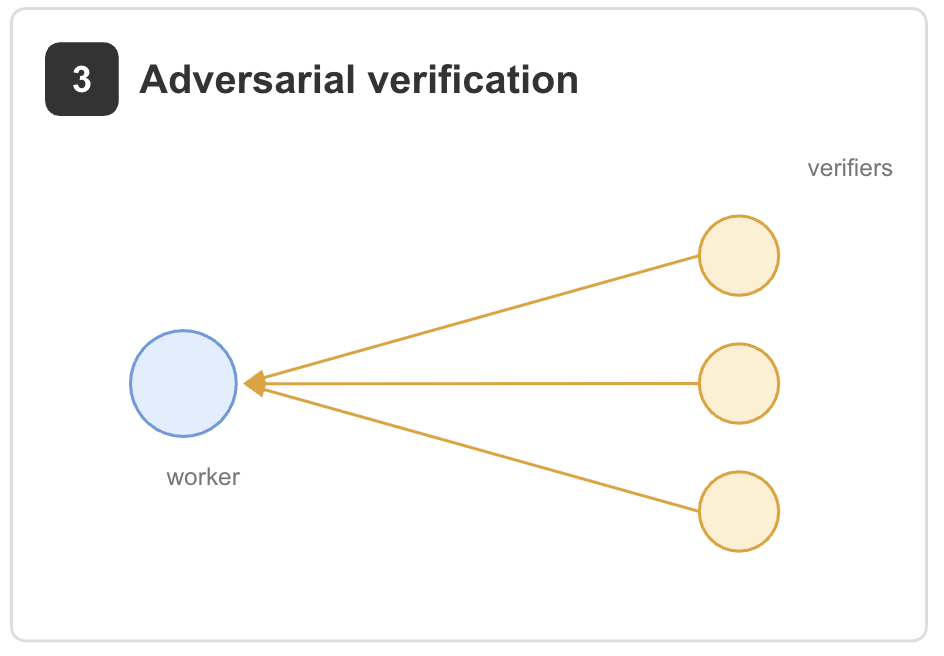
Example: the verification phase of the productivity-research workflow. Reviewer agents check whether findings are supported by the cited studies and flag weak or contradictory claims. The same pattern can be used to fact-check a draft by assigning one verifier per claim [2].
4. Generate and filter. Generate many candidates first, then evaluate and narrow them down.
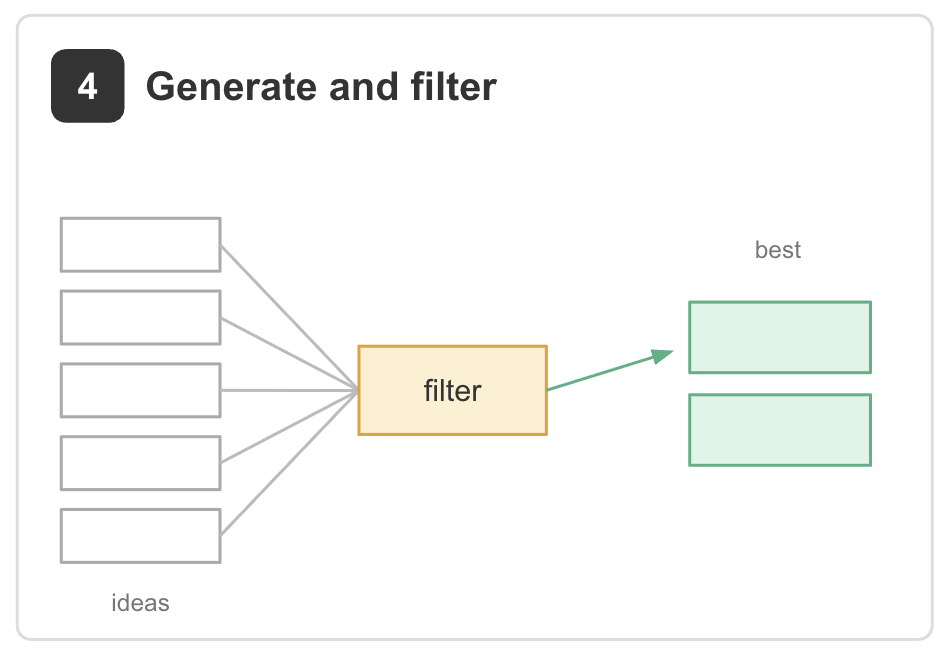
Example: generating dozens of titles, designs, or solution approaches before selecting the strongest few. The key principle is that the generator and evaluator should be separate agents [2].
5. Tournament. Candidates compete through pairwise comparisons rather than independent scoring.
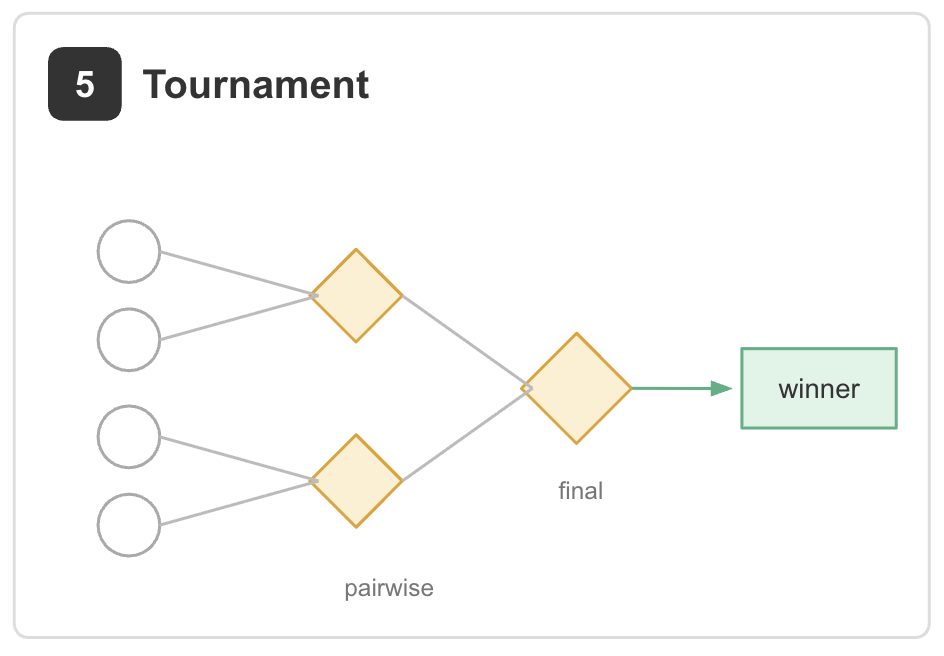
Example: ranking thousands of resumes, proposals, or generated outputs. Each comparison is judged independently, reducing the bias and context accumulation that often appear in long evaluation sessions [2].
6. Loop until done. Repeat a process until a meaningful stopping condition is reached.
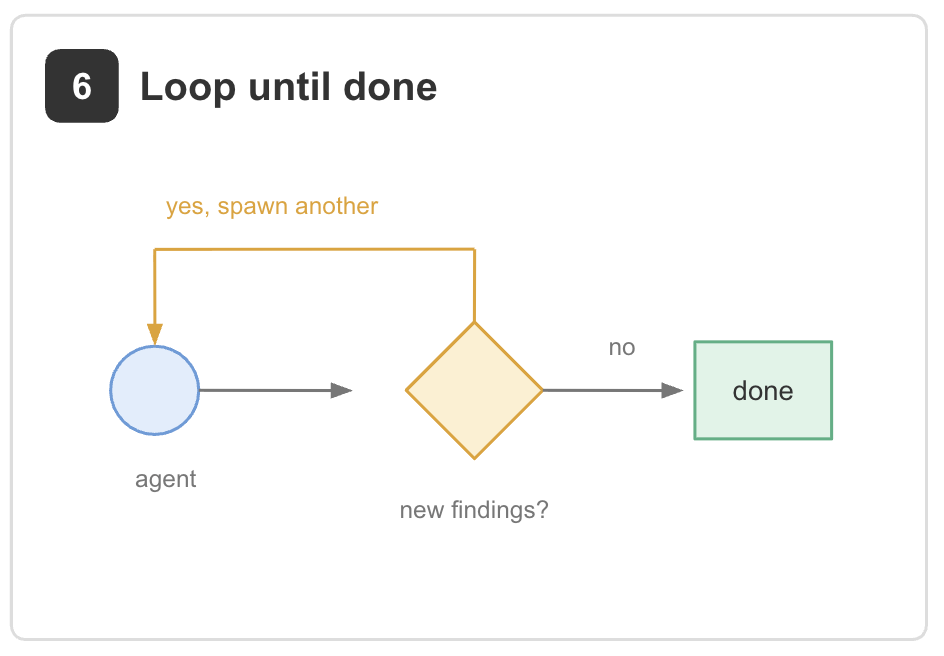
Example: investigating a flaky test by generating hypotheses, testing them in isolated worktrees, and continuing until successive passes fail to uncover anything new. Unlike a fixed number of iterations, the workflow stops when the task is genuinely exhausted [2].
Most real workflows combine several of these patterns rather than relying on just one. The productivity-research workflow, for example, uses fan-out and synthesis to collect evidence, adversarial verification to challenge conclusions, and filtering to decide which studies are relevant.
2.4 How Workflows Are Run, Monitored, and Shared?
A few operational details matter as much as the orchestration patterns.
Workflows run in the background. Once approved, a workflow executes independently while the main session remains available. The
/workflowsview provides live visibility into progress, including active phases, individual agents, token consumption, and tool usage [1].Execution can be paused, stopped, and resumed. The live view supports pausing or terminating a run at any point. If execution is interrupted, for example, by closing the terminal, resuming the same session continues from the previous state rather than starting over [1][2].
Workflows can be saved and shared. Completed workflows can be exported as JavaScript files. Packaging the workflow alongside a
SKILL.mdfile and any supporting rubrics allows it to be distributed and reused in the same way as a skill [2].Token usage can be controlled. Because workflows coordinate many agents in parallel, they can consume significant numbers of tokens. Budget constraints can be specified in the prompt, and execution can be stopped at any time from the
/workflowsview [1][2].Not every task needs a workflow. Workflows are designed for problems that are large, parallel, iterative, or adversarial. Small, linear tasks are usually solved more efficiently with a single prompt. The value of a workflow comes from the coordination it provides, not from the number of agents involved [2].
/workflows.Workflows sit at the top not because they are the most powerful option in every situation, but because they introduce the most coordination overhead.
3. Applying Dynamic Workflow: An End-to-End Research Workflow
Let’s explore the run around productivity-research workflow
3.1 How Did the Workflow Organize the Work?
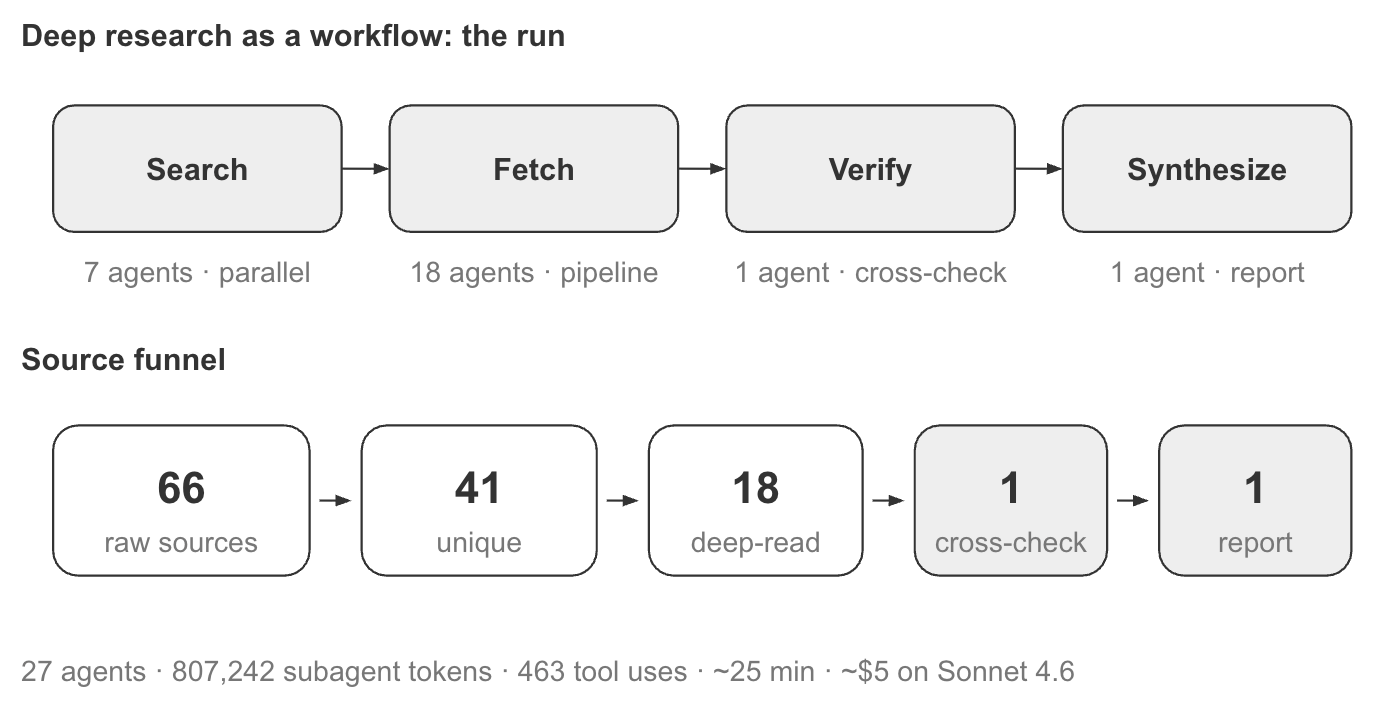
The productivity-research workflow materialized as a four-phase execution graph: Search, Fetch, Verify, and Synthesize. Together, these phases implement a fan-out-and-synthesize pattern with an adversarial verification step before the final report is written [2].
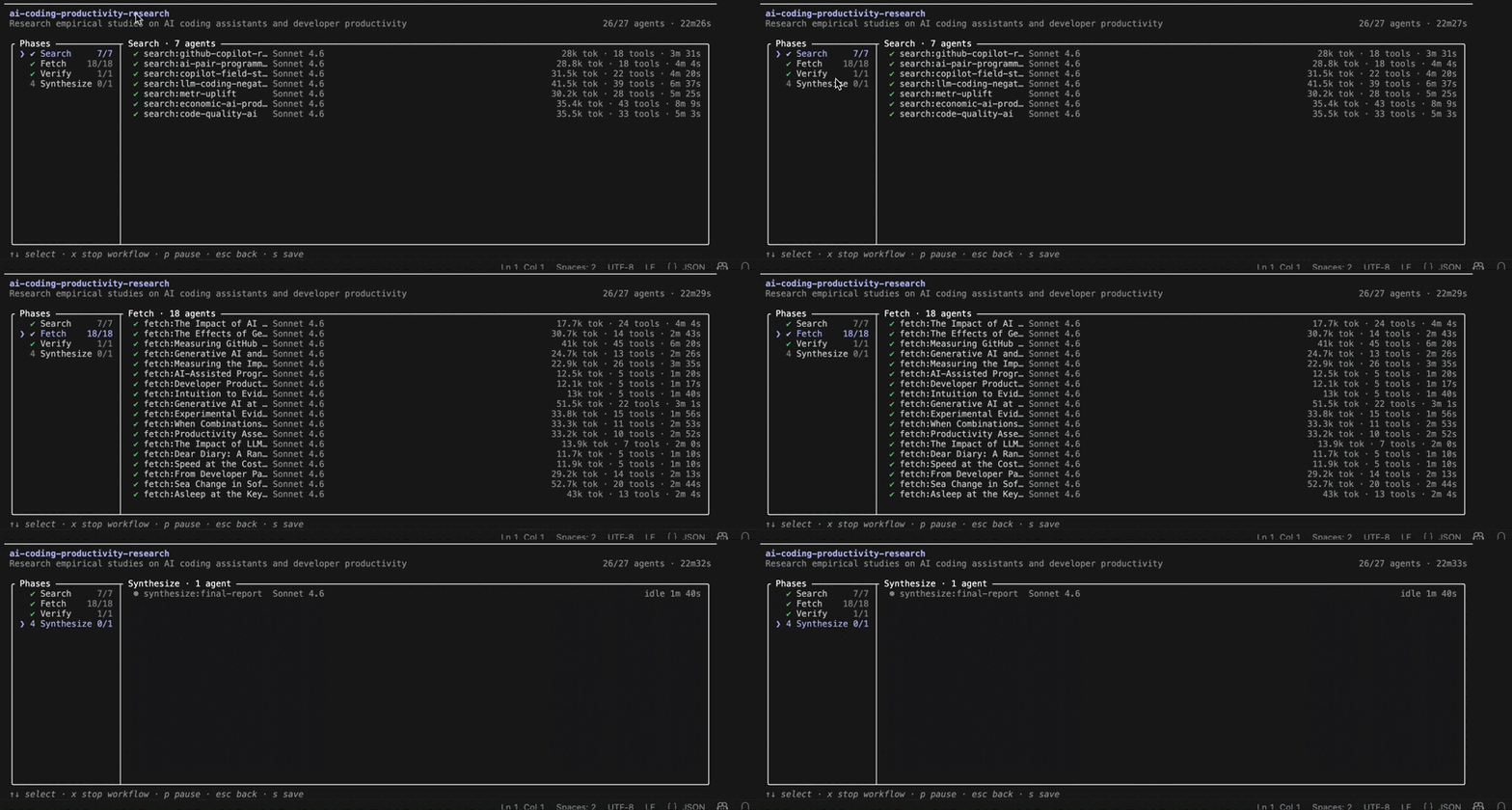
/workflows view during the Search phase. Seven research agents run in parallel, each pursuing a different line of evidence. The interface shows per-agent token consumption, tool usage, runtime, and overall workflow progress.Several aspects of the design are visible in the live view.
The workflow decomposed the problem into phases. The left-hand panel shows the execution plan: Search, Fetch, Verify, and Synthesize. Each phase must complete before the workflow can advance to the next stage.
The Search phase fanned out into seven parallel agents. Rather than asking one agent to investigate AI coding assistants broadly, the workflow assigned different research angles to separate agents.
Each agent operated independently. The center panel shows the active research agents, while the right side tracks token consumption, tool usage, and execution time. Because every agent has its own context window, they can explore different evidence without influencing one another.
The workflow coordinated the work; the agents performed it. The orchestration layer determined how many agents to launch, tracked their completion, and waited for all search tasks to finish before moving to the next phase. This is the synchronization barrier characteristic of the fan-out-and-synthesize pattern [2].
Once the search phase completed, the workflow moved into deeper analysis.
Fetch reduced the source set to the most relevant studies and extracted structured evidence. Each selected paper was analyzed for methodology, sample size, reported effects, limitations, and funding sources.
Verify introduced an independent reviewer. A dedicated verification agent cross-checked findings across studies, looked for contradictions, and highlighted areas where conclusions depended on methodology or study design.
Synthesize produced the final report. Instead of receiving summaries of summaries, the synthesis agent received the enriched evidence gathered by previous phases and generated the final analysis.
3.2 What Value Did the Verification Phase Add?
This is where the workflow earned its extra tokens. A single agent reviewing its own work is vulnerable to self-preferential bias. An independent verification agent is not [2].
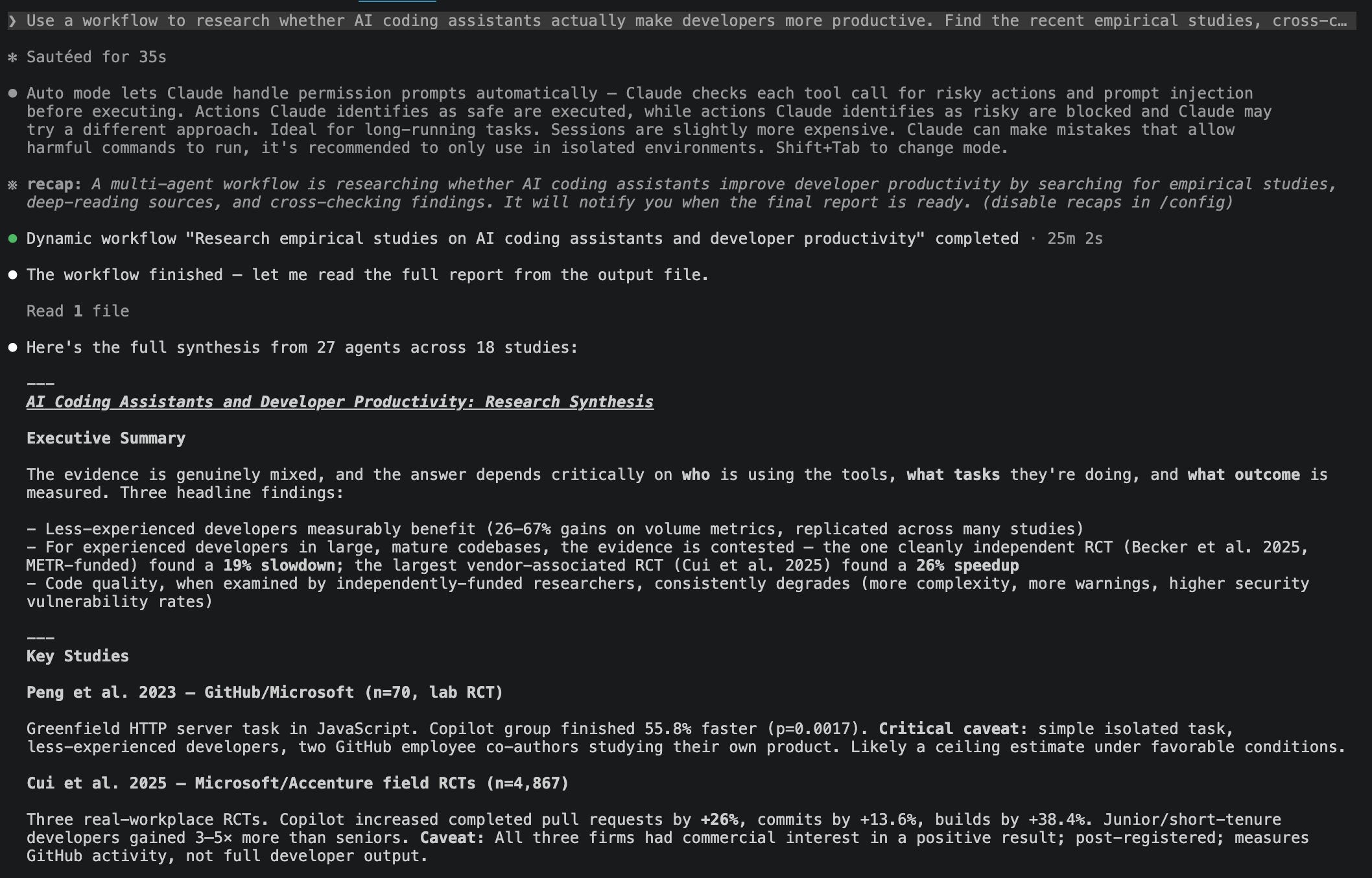
Handling conflicting results. The verify phase surfaced a genuine conflict in the literature. Becker et al. (2025), an independent study of experienced developers working in mature repositories, found a 19% slowdown from AI assistance [6]. Peng et al. (2023), a GitHub-affiliated study on a simpler coding task, reported a 55.8% speedup [5]. Rather than averaging the two results, the workflow treated the disagreement as something to explain. The final report traced the gap to differences in task complexity, developer experience, and study design.
Detecting systematic patterns. The cross-check also identified a funding pattern. The strongest positive results tended to come from vendor-affiliated studies, while independent studies more often reported mixed, null, or negative effects for experienced developers. The report highlighted this pattern without dismissing either side of the evidence.
Preserving counterintuitive findings. Finally, the verification phase preserved one of the most surprising findings. In Becker et al., developers believed they had become substantially faster, even though measured productivity declined [6]. The gap between perceived and measured performance became a key result rather than a detail lost during synthesis.
These insights emerged because one agent was tasked with challenging the conclusions produced by others rather than simply extending them.
3.3 What Are the Costs and Limitations of This Approach?
The workflow spawned 27 agents, consumed roughly 807,000 subagent tokens across 463 tool calls, and completed in about 25 minutes. On Sonnet 4.6, that corresponds to roughly $5 in subagent costs alone. The token warning shown during approval is there for a reason: workflows can be substantially more expensive than a single conversation [1].
Three caveats are worth keeping in mind:
The sources were retrieved, not curated. The workflow can analyze only the studies it finds.
Structured outputs improve reliability, not correctness. JSON schemas reduce drift in extracted findings, but they do not guarantee that a paper was interpreted correctly.
The result is a snapshot. A rerun next month may find different studies and reach different conclusions.
The broader lesson is less about AI coding assistants than about workflow design. The workflow added value because the question was contested and required evidence to be compared, challenged, and synthesized. For a simple factual lookup, the same machinery would have added cost without adding insight. That brings the discussion back to the coordination ladder from Chapter 1: workflows are most useful when the difficulty lies in coordinating the work, not merely producing an answer.
Key Takeaways
✓ The limitations of a single agent are often structural rather than prompt-related. Agentic laziness, self-preferential bias, and goal drift emerge naturally as tasks grow in scope. Workflows mitigate these issues by distributing work across specialized agents with independent contexts and explicit responsibilities.
✓ Workflows should be treated as the highest level of coordination, not the default. Skills, subagents, agent teams, and workflows form a progression of increasing complexity and overhead. A workflow becomes valuable when the task requires substantial parallelism, verification, or orchestration across many steps.
✓ Dynamic workflows move orchestration from the conversation into code. Rather than coordinating work through a single context window, Claude generates a JavaScript workflow that defines phases, branching logic, synchronization points, and agent allocation. This separation allows complex processes to scale beyond what a single conversation can comfortably manage.
✓ A small number of coordination patterns underpin most workflows. Classify and act, fan out and synthesize, adversarial verification, generate and filter, tournament, and loop until done provide reusable building blocks that can be combined to solve more complex problems.
✓ The primary benefit of a workflow is improved coordination and validation. In the productivity-research example, the value came from independently reviewing evidence, explaining conflicting findings, identifying systematic patterns, and preserving counterintuitive results. For simpler tasks, the same orchestration would add cost and complexity without providing meaningful benefits.
References
[1] Anthropic, Orchestrate subagents at scale with dynamic workflows, Claude Code Documentation, 2026.
[2] T. Shihipar and S. Bidasaria, A harness for every task: dynamic workflows in Claude Code, Anthropic, June 2026.
[3] Anthropic, Introducing Claude Opus 4.8, May 28, 2026.
[4] Nate Herk, Claude Code Dynamic Workflows Clearly Explained, YouTube, 1 June 2026
[5] S. Peng, E. Kalliamvakou, P. Cihon, and M. Demirer, The Impact of AI on Developer Productivity: Evidence from GitHub Copilot, arXiv:2302.06590, 2023.
[6] J. Becker et al., Measuring the Impact of Early-2025 AI on Experienced Open-Source Developer Productivity, METR, arXiv:2507.09089, 2025.
[7] K. Z. Cui, M. Demirer, S. Jaffe, L. Musolff, S. Peng, and T. Salz, The Effects of Generative AI on High-Skilled Work: Evidence from Three Field Experiments with Software Developers, SSRN 4945566, 2025.
[8] Mark Kashef, The 6 Best Patterns for Claude Code Dynamic Workflows, YouTube, 5 June 2026